Agent Monitor rules
Create rules to detect and block dangerous agent actions. Access rules at Agent Monitor Rules.
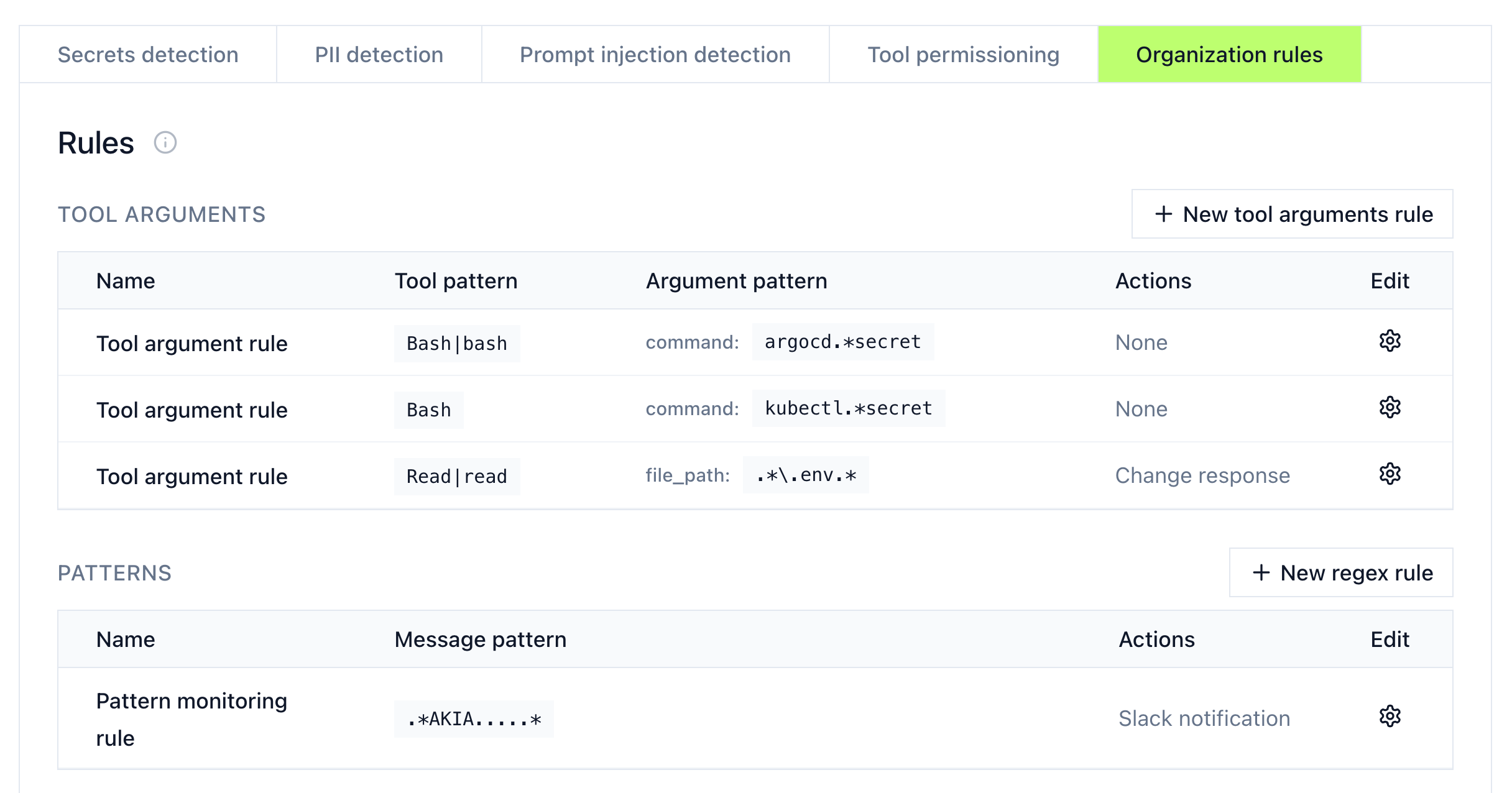
Built-in detection
| Category | What it detects |
|---|---|
| Secrets | API keys, access tokens, credentials being sent to models |
| Prompt injection | Potential injection attempts in prompts |
| Tool permissioning | Unauthorized tool access attempts |
For PII and DLP detection, use gateway middleware: block and mask starter templates connect AWS Bedrock Guardrails, Google Cloud Model Armor, OpenAI moderation, Teleskope, or any DLP service with an API.
Works with zero data retention (ZDR): with content logging off, Mintive stores no prompts, responses, or tool-call content.
Custom rules
Create organization-specific rules under the Organization Rules section.
Tool arguments rules
Match tool calls with specific argument patterns:
- Click + New tool arguments rule
- Set the tool pattern (e.g.,
Bash,Read|read) - Define argument conditions (e.g.,
command: kubectl.*secret) - Choose an action
Pattern rules
Match message content using regex:
- Click + New regex rule
- Define the pattern to match
- Choose an action
Actions
| Action | Effect |
|---|---|
| None (flag only) | Logs the action without blocking. Review at Live Activity. |
| Block | Stops the prompt or tool call from running and surfaces an error to the agent. |
| Ask user | Pauses the tool call and asks the user to approve it. Agents that can't prompt from a hook block the call instead; on Codex, the call proceeds and the rule's reason is passed to the agent as advisory context. |
| Mask | Redacts matching content and lets the agent continue with the redacted version. |
| Slack notification | Sends an alert to a Slack channel. |
Support matrix for block and mask
Block and mask don't work in every phase on every agent. Some combinations silently fall back to blocking, and others have no effect at all, so picking the right phase matters when you want masking to actually mask.
Claude Code
Claude Code uses a single hook system (PreToolUse / PostToolUse).
| Phase | Block | Mask |
|---|---|---|
| Prompt | ✅ Supported | ❌ Blocks instead |
Pre-tool (PreToolUse) | ✅ Supported | ✅ Supported |
Post-tool (PostToolUse) | N/A | ✅ Supported |
Codex
Codex registers the same hook events as Claude Code (PreToolUse / PostToolUse / UserPromptSubmit), but its command hooks can't rewrite tool output after it runs, so post-tool masking blocks the result instead. Codex hooks also can't prompt for confirmation, so a rule with the Ask user action allows the call to proceed and passes the rule's reason to the agent as advisory context; the event is still recorded in Live Activity.
| Phase | Block | Mask |
|---|---|---|
| Prompt | ✅ Supported | ❌ Blocks instead |
Pre-tool (PreToolUse) | ✅ Supported | ✅ Supported |
Post-tool (PostToolUse) | N/A | ❌ Blocks instead |
Cursor
Cursor ships two hook systems with different names. The newer preToolUse / postToolUse hooks line up with Claude Code's hook names and support masking; the older beforeMCPExecution / afterMCPExecution hooks fire only for MCP tool calls and can't mask. Pick the tab that matches the hooks registered in your ~/.cursor/hooks.json.
- New hooks (preToolUse / postToolUse)
- Old hooks (beforeMCPExecution / afterMCPExecution)
| Phase | Block | Mask |
|---|---|---|
| Prompt | ✅ Supported | ❌ Blocks instead |
Pre-tool (preToolUse) | ✅ Supported | ✅ Supported |
Post-tool (postToolUse) | N/A | ✅ Supported |
| Phase | Block | Mask |
|---|---|---|
Prompt (beforeSubmitPrompt) | ✅ Supported | ❌ Blocks instead |
Pre-tool (beforeMCPExecution) | ✅ Supported | ❌ Blocks instead |
Post-tool (afterMCPExecution) | N/A | ❌ No effect |
GitHub Copilot
GitHub Copilot CLI registers four hook events: UserPromptSubmit, PreToolUse, PostToolUse, and PostToolUseFailure. UserPromptSubmit fires after the prompt is already submitted to the model, so prompt-phase rules have no effect. Copilot honors modifiedResult on a successful PostToolUse, so post-tool masking is real model-visible output replacement, not a fallback to block. PostToolUseFailure fires after a tool fails: Mintive logs the event, evaluates rules, and redacts the stored error copy, but returns no response Copilot acts on, so the model-visible error is unchanged.
| Phase | Block | Mask |
|---|---|---|
Prompt (UserPromptSubmit) | ❌ No effect | ❌ No effect |
Pre-tool (PreToolUse) | ✅ Supported | ✅ Supported |
Post-tool, success (PostToolUse) | N/A | ✅ Supported |
Post-tool, failure (PostToolUseFailure) | ❌ No effect | ❌ Stored copy redacted; model sees original error |
Copilot is currently the only client where Mintive registers a distinct failure-event hook. Claude Code, Codex, and Cursor do not install a separate failed-tool hook.
Block and mask behavior
- Mask in the prompt phase falls back to block. No agent supports rewriting a user prompt mid-flight, so a mask rule on a prompt stops the request entirely instead of redacting it. Scope the rule to a tool phase if you only want to redact.
- Post-tool block is N/A. Once a tool has run, blocking it isn't possible, so write a pre-tool rule if you need to stop execution.
- Post-tool mask on Codex fails closed. Codex command hooks can't rewrite tool output, so rather than letting unmasked content through, a post-tool mask rule blocks the result.
- Use Cursor's new hooks if you need masking. Only
preToolUseandpostToolUsecan redact content; the olderMCPExecutionhooks always fall back to block. - Copilot
PostToolUseFailureis monitor-only at the model level. Mintive logs, evaluates rules, and redacts the stored error copy, but the model already received the error and the hook response cannot block or rewrite it. - Post-tool events happen after execution. Successful result replacement (
PostToolUseon Copilot) protects what the model sees, not what the tool already changed on disk or over the network.
Manage rules
Edit or delete rules using the settings icon next to each rule.