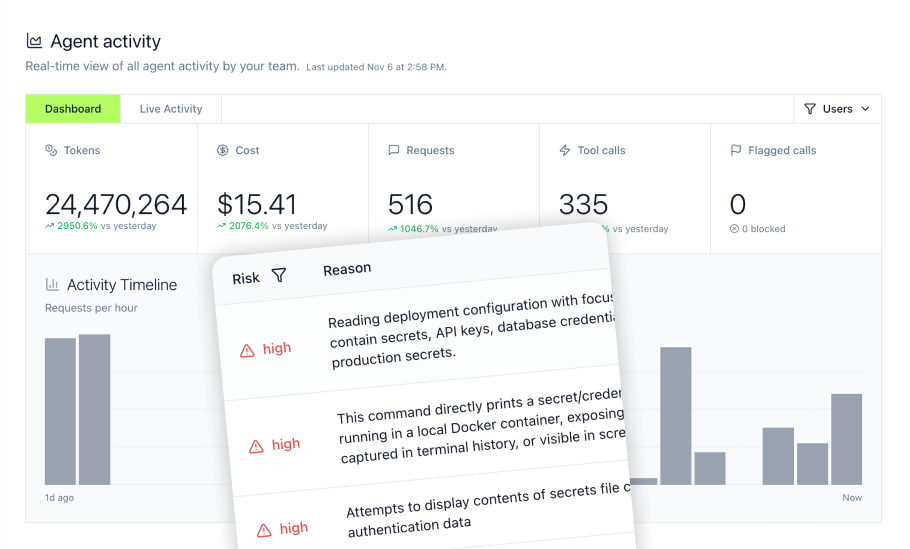
Your AI agents are making tool calls, accessing databases, and pulling data from internal systems. Without a centralized gateway, you have no visibility into what they're doing, no control over what they can access, and no audit trail when something goes wrong. An MCP gateway solves this by intercepting all agent traffic, enforcing authentication and authorization policies, and logging every action for compliance review. This guide walks you through the complete implementation process, from infrastructure setup to production deployment.
Key Takeaways
- Overprivileged AI agents increase security exposure, making scoped identity, access control, and audit logging essential before production deployment
- Gateway performance depends on deployment architecture, backend latency, policy checks, and traffic patterns, so teams should test expected peak load before production
- Strategic gateway routing and semantic caching can reduce repeated LLM calls, but savings vary by workload, cache-hit rate, and response-safety requirements
- Per-agent identity with scoped credentials eliminates the shared-key antipattern that creates security blind spots
- Shadow AI detection hooks in developer tools like Cursor and Claude Code catch off-gateway agent activity before it becomes a compliance problem
- Gateway-based governance reduces manual security-review work by centralizing access rules, approvals, audit logs, and credential lifecycle management
Understanding the Need for an AI Agent Gateway and Access Control
AI agents running Claude, Cursor, ChatGPT, Gemini, or Copilot need access to internal systems to be useful. They query databases, pull from CRMs, post to Slack, and create tickets in Jira. The problem is that traditional API security assumes human users making predictable requests. Agents operate differently.
The Challenges of Unleashing Enterprise AI Agents
Modern AI agents create unique security challenges that existing infrastructure wasn't designed to handle:
- Autonomous decision-making: Agents decide which tools to call and when, creating unpredictable access patterns
- Credential sprawl: Each agent integration requires its own API keys, creating hundreds of scattered secrets
- Scope creep: Agents often receive overly broad permissions because scoping them correctly takes too much time
- Audit gaps: Traditional logging captures HTTP requests but misses the semantic context of what an agent was trying to accomplish
- Multi-step workflows: A single user prompt can trigger dozens of tool calls across multiple systems
These challenges compound in enterprise environments where dozens of teams deploy agents independently, each with their own credential management practices and access policies. The NIST AI Risk Management Framework emphasizes governance and accountability for AI systems accessing sensitive data.
Why Traditional Security Falls Short for AI Agents
Standard API security approaches treat every request as independent. They validate tokens, check permissions, and log the request. But AI agents operate in conversational contexts where a sequence of requests forms a coherent workflow.
When an agent queries your customer database, then pulls email history, then drafts a response, traditional security sees three unrelated API calls. A proper AI gateway sees one workflow and can enforce policies like "agents cannot combine customer financial data with communication history without approval."
Introducing the AI Agent Gateway Concept
An AI agent gateway sits between your agents and everything they access: LLMs, MCP servers, APIs, databases, and other agents. It provides:
- Unified authentication: One SSO-fronted endpoint for all agent traffic, regardless of what backends they access
- Policy enforcement: Real-time evaluation of who can access what, with token budgets and rate limits
- Protocol normalization: Normalizes MCP tool calls, REST-style services, connector runtimes, and supported agent workflows behind governed endpoints
- Full observability: Traces that capture the complete context of multi-step agent workflows
The gateway approach means agents do not need scattered, unmanaged credentials for every backend system. They authenticate to the gateway, and the gateway brokers access through governed credentials, scoped tokens, or per-agent authorization flows depending on the connector.
Implementing Robust Access Control for AI Agent Traffic
Access control for AI agents requires rethinking traditional identity and permission models. Agents aren't users, but they shouldn't share user credentials either. Effective authentication and identity management gives each agent its own identity while connecting it to the human or team responsible for its actions.
Defining Least Privilege for AI Agents
Least privilege for agents means scoping access to exactly what each agent needs for its specific purpose:
- Tool-level granularity: Enable database reads but block writes. Allow Slack posting but prevent channel creation.
- Data scope limits: An agent processing support tickets should only access tickets, not the full CRM.
- Time-bounded access: Grant temporary elevated permissions for specific tasks, then automatically revoke.
- Context-aware permissions: Allow certain actions only when triggered by specific users or during business hours.
Start with zero access and add permissions incrementally based on observed agent behavior. Most agents need far fewer permissions than they receive by default.
Authentication Methods for Secure Agent Identities
OAuth for AI agents is a common authentication pattern for enterprise AI agent deployments. The gateway handles OAuth token acquisition and refresh, so agents never see long-lived credentials:
- OAuth 2.0 client credentials: Each agent gets its own client ID and secret for machine-to-machine authentication
- Token rotation: Credentials rotate automatically on configurable schedules without disrupting agent operations
- Scope mapping: OAuth scopes translate directly to allowed tools and data access
- SSO integration: Agent identities connect to Okta, Azure AD, or Google Workspace for centralized management
The key principle is that each agent has its own credentials with scoped permissions. When one agent's credentials are compromised, you revoke just that agent without affecting others.
Granular Authorization: Who Can Access What
Role-based access control maps teams and roles to permitted tools and data sources. A gateway enforcing tool governance policies might look like this:
| Role | Allowed Tools | Data Access | Restrictions |
|---|---|---|---|
| Support Agent | Zendesk, Slack, Knowledge Base | Customer tickets only | No billing data |
| Sales Agent | Salesforce, Email, Calendar | Assigned accounts only | Read-only CRM |
| Engineering Agent | GitHub, Jira, CI/CD | Team repos only | No production secrets |
Configure policies declaratively so security teams can review and approve changes before deployment. Avoid embedding access rules in agent code where they're harder to audit.
Leveraging an API Gateway for AI Agent Orchestration
AI agent gateways build on traditional API gateway patterns but add capabilities specific to agentic workloads. The gateway becomes the orchestration layer that routes requests, manages load, and enforces consistent policies across all agent traffic.
Centralized Traffic Management for AI Workflows
Routing all agent traffic through a central gateway provides several operational benefits:
- Single point of policy enforcement: Apply security rules once rather than in every agent
- Traffic visibility: See aggregate patterns across all agents in one dashboard
- Failover handling: Route around unavailable backends without agent code changes
- Cost allocation: Track token usage and API costs by team, project, or agent
The gateway also handles protocol differences between agents and backends. An agent making MCP tool calls can access supported backends through the gateway's translation layer, while the gateway normalizes differences across MCP transports, REST-style services, and connector runtimes.
API Gateway Features Essential for AI Agents
Standard API gateway features apply differently to AI agent traffic:
- Rate limiting: Set per-agent or per-team limits on requests, tokens, or cost. An agent hitting rate limits gets queued or rejected rather than hammering the backend.
- Request routing: Direct traffic to appropriate backends based on request type. Simple queries route to faster, cheaper models; complex reasoning routes to more capable models.
- Load balancing: Distribute requests across multiple backend instances. For self-hosted models, route to GPUs with available capacity.
- Circuit breaking: Automatically stop sending traffic to failing backends. Prevents cascading failures when one service goes down.
Configure timeouts generously for AI workloads. Tool calls to external services can take 10 to 15 seconds, far longer than typical API requests.
Scalability and Reliability through Gateway Infrastructure
Production AI gateways need to handle variable loads without adding avoidable latency. Evaluate gateway performance using your own workloads, policy checks, connector mix, and backend locations:
- Measured gateway overhead: Test the latency added by authentication, authorization, logging, and middleware
- Throughput under load: Validate requests per second using realistic tool-call patterns
- Failover behavior: Confirm agents continue operating when a backend or region becomes unavailable
- Queue management: Smooth burst traffic instead of rejecting requests unexpectedly
Deploy the gateway in the same cloud region as your LLM providers to minimize network latency. When using self-hosted models, colocate the gateway with your GPU infrastructure.
Securing AI Agent Interactions with Advanced API Security Practices
Security for AI agents extends beyond authentication and authorization. You need real-time threat detection, data loss prevention, and policy enforcement on every tool call. Understanding MCP data risks helps you design appropriate controls, particularly around the risks outlined in the OWASP Top 10 for Large Language Model Applications.
Real-time Threat Detection for AI Agent Activities
Monitor agent traffic for patterns that indicate security problems:
- Credential exposure: Detect API keys, tokens, or passwords in agent requests or responses
- PII exfiltration: Flag attempts to extract personal data outside approved channels
- Prompt injection: Identify malicious instructions embedded in data the agent processes
- Unusual access patterns: Alert when agents access data outside their normal behavior
Block or flag threats automatically based on severity. High-confidence detections like exposed API keys get blocked immediately. Lower-confidence anomalies get flagged for human review.
Inline Data Loss Prevention for Sensitive Information
DLP integration at the gateway layer catches sensitive data before it leaves your perimeter. Configure the gateway to:
- Mask PII in logs: Replace sensitive data with tokens for audit trails without exposure
- Block sensitive responses: Prevent agents from returning credit card numbers, SSNs, or health data
- Classify data automatically: Tag requests and responses with sensitivity levels for downstream handling
- Integrate with existing DLP: Connect to services like AWS Bedrock Guardrails, Google Cloud DLP, or Nightfall
The gateway's position in the traffic path makes it the ideal enforcement point for DLP policies. Data gets checked on every request without requiring changes to agents or backends.
Zero-Trust Principles in AI Agent Security
Zero-trust architecture assumes no request is trustworthy by default. Every tool call requires:
- Authentication: Verify the agent's identity on every request
- Authorization: Confirm the agent has permission for this specific action
- Validation: Check that request parameters match expected patterns
- Logging: Record the request with full context for audit
Never grant implicit trust based on network location or prior requests. An agent authenticated five seconds ago still needs to prove its identity on the next request.
Managing AI Agent Identities and Credentials at Scale
Credential management becomes exponentially harder as agent deployments grow. Without centralized control, teams create shared service accounts, embed credentials in code, and lose track of what has access to what.
The Importance of Per-Agent Identity
Giving each agent its own identity solves multiple problems simultaneously:
- Audit attribution: Every action traces back to a specific agent and its responsible team
- Blast radius containment: Compromised credentials affect only one agent
- Independent rotation: Rotate one agent's credentials without coordinating with other teams
- Granular revocation: Disable a misbehaving agent without affecting others
Per-agent identity also enables per-agent policies. A data analysis agent gets database read access. A customer support agent gets CRM access. Neither gets the other's permissions.
Automating Credential Lifecycle Management
Manual credential rotation doesn't scale. Automate the entire lifecycle:
- Provisioning: New agents automatically receive credentials when registered
- Rotation: Credentials rotate on schedule, typically every 30 to 90 days
- Revocation: Disabled agents have credentials revoked immediately
- Emergency rotation: Rotate all credentials for a team or service with one command
Store credentials in a secure vault that agents access at runtime. Never embed credentials in agent code or configuration files checked into version control.
Integrating with Enterprise Identity Providers
Connect agent identities to your existing identity infrastructure:
- SCIM synchronization: Agent permissions update automatically when team membership changes in Okta or Azure AD
- Group-based policies: Map IdP groups to gateway access policies
- SSO for administration: Admin access to the gateway requires the same SSO as other enterprise tools
- Directory-aligned governance: Agent access policies can align with IdP groups and team membership for consistent management
When someone leaves a team, their associated agents lose access automatically through SCIM deprovisioning. No manual cleanup required.
Ensuring Compliance and Auditability for AI Agent Operations
Regulated industries need audit trails that prove what agents accessed and why. A gateway capturing full conversation context provides the evidence compliance teams need.
Building Audit Trails for AI Agent Actions
Comprehensive logging captures:
- Who: The agent identity and the human user who triggered the action
- What: The exact tool call, parameters, and response
- When: Timestamps with millisecond precision
- Why: The conversation context that led to this tool call
- Result: Success, failure, or policy denial with reason
Retain logs for the period required by your compliance framework, record type, and internal policy. Store logs immutably so they cannot be modified after the fact.
Meeting Regulatory Requirements with AI
AI agent governance touches multiple compliance frameworks:
- SOC 2: Requires access controls, monitoring, and incident response procedures
- HIPAA: Requires audit controls for systems that access electronic protected health information
- GDPR: Requires data access logging and the ability to delete personal data
- Industry regulations: Financial services, healthcare, and government have additional requirements
Map gateway capabilities to specific compliance requirements. Access control supports SOC 2 CC6.1-style control expectations. Audit logging supports HIPAA audit-control requirements for PHI workflows. For GDPR, teams should evaluate data processing, retention, deletion, and regional handling requirements rather than treating data residency as a standalone compliance solution.
Integrating with Security Information and Event Management
Export gateway logs to your SIEM for correlation with other security data:
- Splunk integration: Ship logs in Splunk HEC format
- Microsoft Sentinel: Export to Azure Log Analytics workspace
- S3 archival: Store raw logs in S3 for long-term retention and custom analysis
- Real-time streaming: Send events to Kafka for immediate processing
SIEM integration lets security teams correlate agent activity with network events, user behavior, and threat intelligence. An agent accessing unusual data right after a phishing campaign targets your company raises a different alert than normal access.
Detecting and Preventing Shadow AI Activities
Shadow AI is the use of AI tools outside IT-approved channels. Developers installing MCP servers locally, using personal Claude accounts for work tasks, or connecting Cursor to unapproved backends create security blind spots that gateway-only monitoring misses.
Uncovering Unsanctioned AI Agent Use
Shadow AI detection requires visibility beyond the gateway:
- Developer tool hooks: Monitor MCP activity in Cursor, Claude Code, and similar tools
- Network analysis: Detect traffic to known AI service endpoints
- Endpoint agents: Watch for AI tool installation and usage on company devices
- MDM integration: Push detection and enforcement policies to managed devices
The goal isn't to block all developer AI use. It's to ensure that AI tools connecting to company data go through governed channels.
The Risks of Unmonitored AI Agent Deployments
Unsanctioned AI deployments create specific risks:
- Data leakage: Agents sending proprietary code or customer data to external services
- Compliance violations: Unlogged access to regulated data
- Credential exposure: API keys embedded in local agent configurations
- Supply chain attacks: Malicious MCP servers harvesting data from developer machines
Organizations with shadow AI discovery can address risky agent activity earlier because they can identify off-gateway tools, unmanaged credentials, and unapproved data access before those patterns become incidents.
Strategies for Enforcing AI Policy Across the Enterprise
Balance governance with developer productivity:
- Start with detection: Monitor shadow AI usage before blocking it
- Provide alternatives: Make approved tools easier to use than shadow alternatives
- Gradual enforcement: Move from alert-only to blocking over weeks, giving teams time to migrate
- Exception process: Create a fast path for teams with legitimate needs for non-standard tools
Communicate policy changes clearly. Developers will work around security controls they see as arbitrary obstacles. They'll accept controls they understand protect the company.
Integrating Custom and Third-Party AI Agents into the Gateway
A gateway only provides value if agents actually route through it. Minimize friction for existing agents while maintaining security for new deployments.
Onboarding Diverse AI Agent Models
Support multiple integration patterns:
- Pre-configured connectors: One-click activation for common tools like Salesforce, GitHub, Slack, and Jira
- Custom MCP servers: Host your own MCP servers with automatic OAuth wrapping and scaling
- Virtual MCPs: Bundle multiple servers into single endpoints for specific roles or use cases
- REST API wrapping: Expose traditional APIs as MCP tools for agent consumption
Each integration pattern requires different setup effort. Prioritize pre-configured connectors for common use cases, custom integration for unique internal systems.
Harmonizing Custom and Commercial AI Tools
Enterprise AI deployments typically include:
- Commercial agents: Claude, ChatGPT, Gemini, Copilot from major providers
- Custom agents: Purpose-built agents using internal data and logic
- Open-source tools: Community MCP servers and agent frameworks
The gateway provides a consistent governance layer regardless of agent origin. Apply the same authentication, authorization, and audit policies whether the agent is a commercial product or internal build.
Automating Agent Deployment Workflows
Infrastructure-as-code for agent deployment:
- Terraform providers: Define agent configurations declaratively
- REST APIs: Programmatic management for CI/CD integration
- Admin interfaces: Conversational management for operators who prefer chat to YAML
- GitOps workflows: Agent configurations stored in version control with automated deployment
Automated deployment ensures consistent configuration across environments. An agent tested in staging deploys to production with identical policies.
Optimizing Performance and Scalability for AI Agent Traffic
Performance matters for AI agents because latency accumulates across multi-step workflows. A 50ms gateway overhead becomes 500ms when an agent makes 10 tool calls.
Monitoring AI Agent Health and Performance
Track metrics that matter for agent operations:
- Gateway latency: Time added by the gateway to each request
- Backend latency: Response time from LLMs and tools
- Error rates: Failed requests by type, agent, and backend
- Token usage: Consumption by team, project, and agent
- Cost: Spending by the same dimensions
Set alerts for anomalies. An agent suddenly using 10x normal tokens might indicate prompt injection or a logic bug.
Scaling Gateway Infrastructure for High Demands
Design for growth from the start:
- Horizontal scaling: Add gateway instances as traffic grows
- Regional deployment: Reduce latency by placing gateways near users and backends
- Caching: Semantic caching can reduce repeated model calls, but savings depend on cache-hit rates, similarity thresholds, and how safely cached responses can be reused
- Auto-scaling: Scale gateway capacity automatically based on traffic patterns
Test at expected peak load before production deployment. AI traffic often spikes unpredictably when new agents launch or existing agents get new capabilities.
Analytics for Understanding AI Agent Adoption and Impact
Aggregate metrics reveal organizational patterns:
- Adoption trends: Which teams are using agents? Which tools are most popular?
- Efficiency gains: How much time do agents save compared to manual processes?
- Cost distribution: Where is AI spending concentrated?
- Security posture: Which teams have the most policy violations?
Share dashboards with stakeholders. Executives care about ROI. Security cares about risk. Engineers care about performance. Tailor views to each audience.
Building a Future-Proof AI Agent Governance Framework
The agent landscape changes fast. Your governance framework needs to accommodate new agents, new protocols, and new attack vectors without complete redesign.
The Bundle Model: Simplified Governance for Complex AI Environments
Bundle-based architecture packages tool access, policies, and audit configuration into reusable units:
- One bundle per role: Sales agents get the sales bundle with CRM access and appropriate policies
- SCIM-driven membership: Bundle access updates automatically when team membership changes
- Policy inheritance: Organization policies cascade to team bundles
- Version control: Bundle configurations track changes over time
The bundle approach simplifies both initial setup and ongoing maintenance. Add a new tool to a bundle, and everyone using that bundle gets access automatically.
Evolving Architectures for AI Agent Management
Plan for emerging patterns:
- Agent-to-agent communication: Agents delegating tasks to specialized agents
- Long-running agents: Persistent agents that maintain state across days or weeks
- Memory management: Agents with scoped memory for context retention
- Multi-modal agents: Agents processing images, audio, and video alongside text
Your governance framework should accommodate these patterns without fundamental changes. Design extensibility points now even if you don't use them immediately.
Staying Ahead of the Curve with Emerging Standards
The Model Context Protocol continues evolving. Its contribution to the Linux Foundation’s Agentic AI Foundation signals a move toward neutral ecosystem stewardship while the project’s maintainer-led governance model remains in place. Stay current by:
- Following specification updates: New MCP versions add capabilities and change security requirements
- Participating in standards bodies: Your use cases should influence protocol development
- Testing pre-release features: Evaluate new capabilities before production adoption
- Maintaining vendor relationships: Enterprise gateway providers get early access to specification changes
A standards-aligned gateway protects your investment. Proprietary extensions create lock-in that becomes painful when you need to change providers.
Why MintMCP Delivers Enterprise AI Gateway Governance
MintMCP provides the MCP Gateway and Agent Gateway infrastructure enterprises need to deploy AI agents with full governance. Unlike approaches that require configuring separate objects for plugins, access rules, and agent accounts, MintMCP's Bundle architecture packages tool access, policy enforcement, and audit logging into single units that map directly to teams and roles.
The platform addresses both sides of enterprise AI governance:
MCP Gateway provides governed data and tool connections for Claude, Cursor, ChatGPT, Gemini, and Copilot. Every tool call routes through centralized authentication, authorization, and logging. Teams get one-click deployment for pre-configured connectors while custom MCP servers get hosted with automatic OAuth wrapping and scaling.
Agent Gateway extends governance to agent identities, permissions, memory, and monitoring. Each agent receives its own rotatable credentials through Agent Bundles with M2M authentication. When an agent's credentials need rotation, you rotate just that agent without touching other agents or user credentials.
Key capabilities that differentiate MintMCP:
- Virtual Bundles: SCIM-driven endpoints that automatically update access when team membership changes in Okta or Azure AD
- JS sandbox middleware: Custom policy code execution on every tool call with integrations for AWS Bedrock Guardrails, Google Cloud DLP, and Nightfall
- Agent Monitor: Shadow AI detection through hooks in Cursor and Claude Code, catching off-gateway activity before it becomes a compliance problem
- Hosted MCP runtime: MintMCP operates and scales connector instances on your behalf, so you don't manage Kubernetes pods for the connector layer
MintMCP is SOC 2 Type II audited, compliant with HIPAA standards, pen tested, and every agent action audited. Customers handling protected health information can request HIPAA documentation and sign BAAs. The complete security posture is available in the Trust Center.
Start your free trial to deploy governed MCP connections in minutes rather than weeks.
Frequently Asked Questions
What is the difference between an API gateway and an AI agent gateway?
An API gateway handles request routing, authentication, and rate limiting for traditional HTTP APIs. An AI agent gateway adds capabilities specific to agentic workloads: MCP and connector normalization, token-level cost tracking, conversation-context logging, and policy enforcement that understands multi-step agent workflows. Standard API gateways treat each request independently, while AI gateways recognize that a sequence of tool calls forms a coherent workflow requiring holistic governance.
Can I route existing AI agents through a gateway without code changes?
Yes, most enterprise AI gateways work transparently. Agents continue making standard MCP or API calls, and the gateway intercepts traffic through endpoint configuration changes rather than code modifications. You update the agent's endpoint URL to point at the gateway, configure authentication, and the gateway handles translation to backend services. The agent doesn't need to know it's going through a gateway.
How does per-agent identity differ from per-user access control?
Per-user access control associates permissions with the human who owns or created an agent. Per-agent identity gives each agent its own credential set with scoped permissions independent of its creator. This matters because an agent often needs different permissions than its creator, credentials should rotate on different schedules for humans and agents, and audit trails should distinguish between "user triggered this agent" and "agent performed this action." Per-agent identity also enables blast radius containment: compromising one agent's credentials doesn't expose other agents created by the same user.
What compliance frameworks require AI agent gateway logging?
AI agent gateway logging commonly supports control expectations across SOC 2, HIPAA, PCI DSS, GDPR, and internal security programs. Access controls, monitoring, audit trails, and data-access records help teams document who accessed sensitive systems, what action occurred, and whether the action was allowed or denied. Exact requirements depend on the framework, data type, jurisdiction, and company policy.
How do I detect AI agents operating outside the gateway?
Shadow AI detection requires visibility beyond gateway traffic. Deploy hooks in developer tools like Cursor and Claude Code to monitor local MCP activity. Use MDM to push detection agents to managed devices. Analyze network traffic for connections to known AI service endpoints. The goal is identifying unsanctioned AI tool usage, typically for education and migration to approved channels rather than punitive action. Start with detection-only mode to understand the scope before implementing blocking policies.