The Slack MCP Server transforms how AI agents interact with enterprise collaboration data, enabling Claude, Cursor, ChatGPT, and custom agents to read messages, search conversations, post replies, and manage files through the Model Context Protocol.
However, connecting AI systems to Slack without governance creates significant security exposure. Channel history can contain PII, credentials, source code, customer information, and sensitive business discussions that agents may return through tool responses. Organizations deploying Slack MCP integrations can use a governed MCP Gateway to centralize authentication, enforce access policies, curate tools, and maintain audit trails.
This article covers Slack MCP setup, governed access for AI agents, runtime guardrails, monitoring, and enterprise security controls.
Key Takeaways
- Slack's official MCP server provides AI agents with tools for message and file search, channel history, messaging, files, canvases, users, reactions, conversations, and Slack Lists through standardized MCP interfaces
- Setup complexity varies across Slack's official remote server, community implementations, and managed MCP gateways
- CVE-2025-34072 documented zero-click data exfiltration through link unfurling in Anthropic's deprecated Slack MCP reference server
- A March 2025 security assessment found command injection flaws in 43% of the MCP server implementations it tested
- Virtual MCPs can create role-specific tool surfaces with curated tools, access policies, and SCIM-driven membership
What is a Slack MCP Server and Why Your Enterprise Needs It
A Slack MCP Server exposes Slack capabilities as standardized Model Context Protocol tools that AI clients and agents can call.
Instead of building a custom Slack integration for every AI client, MCP provides a common connection model for supported environments such as Claude, Cursor, ChatGPT, Gemini, Copilot, and custom agent frameworks.
Core Slack MCP Capabilities
Slack MCP tools can support:
- Message operations: Read channel history, search messages, post replies, add reactions, and work with threads
- Files and canvases: Search or retrieve files and work with Slack canvases
- Users and conversations: Retrieve user information and work with channels and other conversations
- Search: Query Slack content using the authenticated user's permitted access
The enterprise concern is access scope. Slack workspaces can contain:
- Customer information
- Credentials shared during troubleshooting
- Source code snippets
- Financial discussions
- HR conversations
- Internal operational data
Without additional governance, agent access largely depends on the Slack permissions and OAuth scopes associated with the connection.
The Governed Gateway Approach
MintMCP's MCP Gateway places a governed connection layer between AI systems and enterprise tools such as Slack.
Through Virtual MCPs, organizations can configure:
- Tool-level curation
- SSO authentication
- SCIM-driven access
- Credential handling
- Centralized audit logging
The same Slack connector can support different governed tool surfaces. For example:
- A read-only Virtual MCP for analysts can expose Slack search, channel history, file-read, and user-profile tools
- A read-write Virtual MCP for support teams can add approved messaging, file, and canvas actions
Setting Up Your Slack MCP Server with MintMCP
Slack MCP integrations generally follow one of three deployment models:
- Slack's Official Remote MCP
- Best for organizations using Slack-supported or approved MCP integrations
- Uses Slack-hosted infrastructure and OAuth
- Relies on Slack's native security and permission model
- Self-Hosted Open Source
- Best for teams with specific implementation requirements and DevOps capacity
- Setup varies by server
- Authentication, hosting, updates, and governance remain the team's responsibility
- Managed MCP Gateway
- Best for organizations that want centralized governance across Slack and other enterprise tools
- Centralizes authentication, access policies, credential handling, tool curation, and audit
Configuring Virtual MCPs for Slack Workflows
With MintMCP, a governed Slack workflow can follow this pattern:
- Connect Slack through the supported OAuth flow
- Create a Virtual MCP containing the Slack connector
- Curate the available Slack tools for the intended role or agent
- Assign access policies using directory groups from your IdP
- Connect the AI client to the generated governed endpoint
This reduces the need for individual developers to maintain separate Slack credentials and MCP configurations across their machines.
MintMCP's hosted connectors can run within the managed connector layer, with credentials handled centrally rather than stored in individual client configurations.
Step 1: Enable Slack MCP and Configure OAuth
Slack hosts its official MCP server at:
https://mcp.slack.com/mcp
You do not need to install a local Slack MCP package when using Slack's official server.
For custom internal Slack apps:
- Enable Slack MCP functionality in the app configuration
- Configure the user OAuth scopes required by the tools you want to expose
- Grant only the Slack permissions necessary for the intended workflow
Slack supports granular permissions across message and channel search, files, messaging, canvases, users, reactions, and other supported MCP actions.
Step 2: Connect to Your AI Client
For Claude Code, Slack's documented setup uses its Slack MCP and Skills Plugin:
/plugin install slack
The plugin configures the Slack MCP connection and prompts the user to complete Slack OAuth.
For Claude Desktop:
- Open Customize → Connectors
- Add Slack
- Complete the OAuth flow
Other compatible MCP clients can connect to Slack's Streamable HTTP endpoint:
https://mcp.slack.com/mcp
Integrating Slack with Enterprise Authentication
Enterprise identity controls can sit in front of governed Slack access:
- SSO: Users authenticate through the organization's identity provider
- SCIM: Directory groups determine who can access specific Virtual MCPs
- Per-user OAuth: Slack actions use permissions associated with the individual user's Slack identity where applicable
- Centralized deprovisioning: Removing a user from an authorized group can revoke their governed MCP access
Common Setup Challenges
missing_scopeerrors- Cause: Required OAuth scopes were added after initial installation
- Resolution: Update the required scopes and reinstall or reauthorize the Slack app where necessary
- Channel access errors
- Cause: The authenticated user or app does not have permission to access the target conversation
- Resolution: Verify Slack permissions, OAuth scopes, and channel membership
- Rate limiting
- Cause: Slack applies tool-specific and API-specific limits
- Resolution: Respect Slack's documented limits, pagination behavior, and
Retry-Afterresponses
Governing AI Agents in Slack
Ungoverned Slack MCP access creates several recurring enterprise risks:
- Data exposure: Agents may retrieve sensitive conversations available to the connected identity
- Credential sprawl: Tokens distributed across individual machines create unmanaged access points
- Attribution gaps: Shared credentials make it harder to distinguish human activity from autonomous agent activity
- Unpredictable actions: Agents choose tools at runtime, and tool descriptions or returned content can become injection surfaces
Assigning Unique Identities to Slack-Based AI Agents
MintMCP's Agent Gateway builds on governed MCP access by treating autonomous agents as first-class non-human principals.
Each agent can receive:
- Its own identity
- Scoped access through a dedicated Virtual MCP
- Independent credentials
- Independent rotation and revocation
- An attributable audit trail
Supported authentication approaches can include:
- Bearer credentials
- OAuth client-credentials or M2M tokens
- Workload identity using short-lived OIDC tokens from the agent's infrastructure
This separates agent access from whichever employee credential happens to be available.
Implementing Role-Based Access Control for Slack Tools
Slack capabilities can be curated around different use cases:
- Read-only analysts
- Slack search
- Channel history
- File retrieval
- User information
- Support agents
- Approved read tools
- Message posting
- Replies
- Selected file or canvas actions
- Automation agents
- Only the tools needed for their workflow
- Restricted channel or resource access through policy where supported
- Administrative workflows
- Broader tool access
- Tighter identity controls
- More extensive audit requirements
RBAC policies can use SCIM-driven directory groups so access changes originate from the organization's identity infrastructure.
Capabilities of AI Agents Operating Through Slack MCP
Governed Slack access can automate workflows that otherwise require repeated manual search and context gathering.
Support Ticket Triage
An agent can:
- Monitor approved support conversations
- Search relevant customer-success or product discussions
- Gather prior context
- Draft responses for review
Potential outcome: Reduce manual context gathering and repetitive ticket work. Track response time, ticket deflection, and handling time against your own baseline.
Sales Meeting Notes
An agent can:
- Process available Slack discussions
- Summarize relevant sales context
- Create CRM tasks through separately governed integrations
- Prepare follow-up actions
Potential outcome: Reduce administrative work and improve consistency of CRM updates.
Incident Response
An agent can:
- Search incident channels
- Find similar historical incidents
- Aggregate thread timelines
- Combine Slack context with separately governed observability tools
Potential outcome: Reduce manual incident correlation and summary preparation. Measure MTTR and investigation time before and after deployment.
Automating Workflows with Slack-Native Coworker Agents
MintMCP's Coworker Agents are persistent agents that can operate alongside employees.
They can support:
- Slack triggers: Respond to approved Slack interactions
- Scheduled execution: Run recurring summaries or workflows
- Persistent work: Continue tasks across days
- Company-owned memory: Maintain memory the organization can review and control
- Governed tools: Use scoped access through Virtual MCPs
- Governed execution: Operate with managed credentials and sandboxed execution
Monitoring and Auditing AI Agent Activity in Slack
Security teams need visibility into what supported AI agents are doing across Slack and other enterprise tools.
Important questions include:
- Which Slack tools did an agent call?
- What information did it request?
- Which files did it access?
- Which user or agent initiated the action?
- How much AI usage and cost did the workflow generate?
Gaining Visibility into Slack Agent Interactions
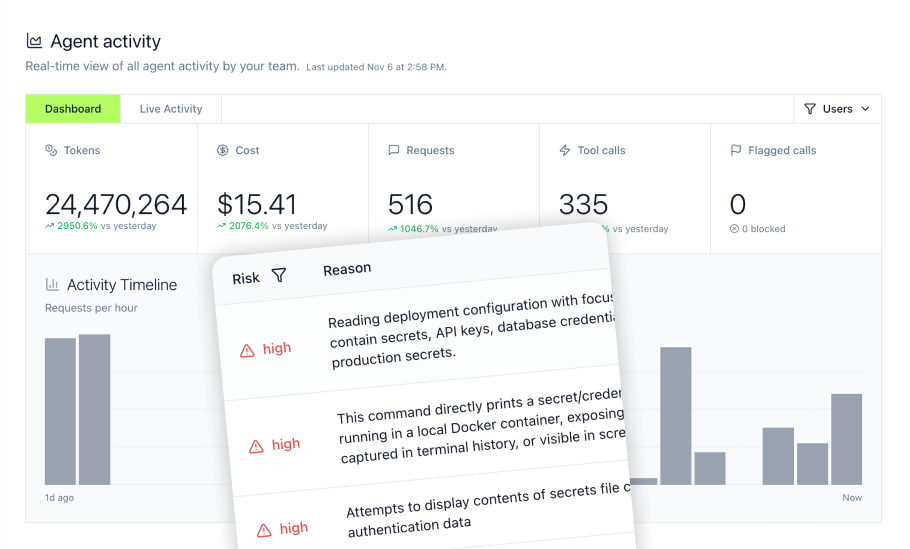
Agent Monitor provides visibility into supported AI-agent activity.
Depending on the client, agent, and hook phase, activity can include:
- Prompts: What users or agents submitted
- MCP tool calls: Supported Slack MCP tool-call activity, including relevant arguments and results where captured
- File access: Supported file activity
- Commands: Supported local or agent command activity
- Usage and cost: Token usage by model, user, agent, or session
Coverage varies by supported environment. Agent Monitor should not be treated as universal visibility into every action performed by every agent.
Its activity views can be filtered by attributes such as:
- User
- Agent
- Tool
- Time period
Exporting Slack Agent Activity to SIEM
MintMCP supports SIEM export through formats including:
- OTLP
- Splunk HEC
Exported security data can include supported:
- MCP tool calls
- Prompt submissions
- Gateway events
- Access-policy changes
MintMCP also maintains tamper-evident access-grant history as a separate audit capability. That history can be signed at write time and verified independently.
Implementing Guardrails for Slack AI Agent Interactions
Visibility explains what happened. Runtime controls determine what should be allowed.
MintMCP's guardrail architecture uses three complementary layers.
Mint Guard
Mint Guard provides managed detection policies for categories such as:
- Prompt injection
- Secrets and credentials
- PII
- Harmful content
Supported modes include monitoring and enforcement.
Rules
Rules provide declarative policy conditions based on:
- Tool names
- Arguments
- Content
- Regex patterns
Supported actions can include:
- Flag
- Block
- Ask user
- Mask
- Notify
Exact action support varies by integration and enforcement point.
Gateway Middleware
Gateway Middleware provides customer-authored JavaScript logic running in a JS sandbox.
Organizations can use it for:
- DLP integrations
- External classifiers
- Resource allowlists
- Content redaction
- Data transformation
- Custom security policy
Protecting Against Prompt Injection
Slack messages and tool results can contain content intended to manipulate agent behavior.
Mint Guard can screen supported tool arguments and returned results.
- High-confidence detections in pre-call inputs can block a downstream action
- Detections in returned content can prevent unsafe results from continuing back to the agent
Integrating Existing Security Tools
Gateway Middleware can integrate external security or classification systems such as:
- AWS Bedrock Guardrails
- Google Cloud Model Armor
- OpenAI moderation
- Custom enterprise DLP systems
For policy-critical workflows, middleware can be configured to fail closed so an unavailable classification service does not silently permit an unscreened action.
Enterprise Security and Compliance for Slack AI Integrations
Enterprise Slack MCP deployments require more than basic OAuth.
Authentication and Identity
MintMCP can provide:
- Enterprise SSO
- SCIM provisioning
- Directory-driven access policies
- Per-user authentication where supported
- Agent identities for autonomous workloads
Security and Compliance Posture
MintMCP is:
- SOC 2 Type II audited
- Compliant with HIPAA standards
- Penetration tested
- Designed to encrypt data in transit and at rest
Customers handling protected health information can request HIPAA documentation, and MintMCP signs BAAs.
Operational Controls
Operational controls can include:
- Organization-wide shutdown controls
- Per-VMCP disable
- Per-tool disable
- Connector restart
- Credential rotation
These controls help security teams respond quickly when an integration or agent needs to be restricted.
Compliance Framework Support
MintMCP controls can support broader compliance programs, but they do not automatically make a deployment compliant.
- PCI DSS: Gateway Middleware can help redact cardholder data before it reaches AI systems
- HIPAA: Agent identity, access controls, audit trails, encryption, and BAAs can support regulated deployments
- SOC 2: Audit and access-control capabilities can support control evidence
- GDPR: Tool-level policies can support least-privilege access and data minimization
Organizations should map individual controls to their own regulatory and compliance requirements.
Centralizing Access with SSO and SCIM
Directory-driven access reduces manual governance:
- Suspend a user in the IdP and their governed MCP access can be revoked
- Add a user to an approved directory group and the corresponding Virtual MCP can become available
- Remove a user from the group and access can be withdrawn without editing individual client configurations
This helps reduce the credential and configuration sprawl described in MintMCP's MCP data risk guide.
The Future of AI Automation in Slack (2026)
Slack now supports MCP in both directions.
Its official MCP server exposes Slack tools to compatible AI systems, while Slackbot can act as an MCP client for approved external MCP servers.
This allows:
- AI systems to search and act on authorized Slack data
- Slackbot to invoke tools from connected external systems
- Agent platforms to layer persistent workflows, state, and orchestration on top
Persistent state, proactive automation, and multi-agent collaboration are properties of the agent platform, not capabilities created automatically by MCP itself.
Strategic Priorities for Enterprise Teams
As agent adoption grows, organizations should focus on:
- Centralized governance: Apply consistent permissions and audit across supported AI systems
- Agent identity: Treat autonomous agents as individually identifiable non-human principals
- Least privilege: Give each user and agent only the tools required for its function
- Runtime enforcement: Detect and stop unsafe actions at the tool boundary
- Portable governance: Avoid rebuilding identity and access controls every time the AI client or model changes
- Company-owned agent infrastructure: Keep important agent memory, permissions, and operating context reviewable and governed
As MCP deployments scale, establishing authentication, scope controls, credential lifecycle policies, and auditability early reduces unmanaged credential and configuration sprawl.
Why MintMCP for Slack MCP Governance
Slack MCP is only one part of an enterprise AI environment. Teams also need to govern who can connect, which tools they can use, what autonomous agents can access, and what happens when something goes wrong.
MintMCP connects these controls through several product layers:
- MCP Gateway: Centralizes governed connections between AI systems and enterprise tools such as Slack
- Virtual MCPs: Create role-specific or agent-specific endpoints with curated tool surfaces and access policies
- Agent Gateway: Gives autonomous agents their own identities, credentials, permissions, and attributable audit trails
- Agent Monitor: Provides visibility into supported prompts, commands, files, MCP activity, usage, and cost
- Mint Guard: Applies managed detection policies for prompt injection, secrets, PII, and harmful content
- Rules: Add declarative conditions for supported tool and agent activity
- Gateway Middleware: Integrates custom JavaScript policy, DLP systems, external classifiers, and resource restrictions
- SIEM export: Sends supported security activity into centralized monitoring systems
- Operational controls: Provide shutdown, disable, restart, and credential-response capabilities
Together, these layers answer different governance questions:
- Which AI clients and agents have Slack access?
- Which Slack tools can each identity use?
- Which credentials are associated with that access?
- What supported actions have agents performed?
- Which policies should block or transform risky tool calls?
- How can an agent, tool, or governed endpoint be disabled?
This creates a consistent governance layer across Slack and other enterprise systems without tying the organization's permission and audit model to a single AI client.
Frequently Asked Questions
What happens to Slack MCP access if an employee leaves the organization?
With SCIM-driven access, removing or disabling a user in the organization's identity system can revoke their Virtual MCP access. Agent identities can be rotated or revoked independently because they do not need to share the departing employee's identity or credentials. Any Slack OAuth credentials tied directly to that employee must also be handled according to the connector's authentication model.
Can I connect Slack MCP to multiple AI clients simultaneously?
Yes, when those clients support the relevant MCP connection and authentication model. A governed MCP endpoint can centralize tool curation, access policies, credentials, audit, and SSO across supported clients, reducing the need to govern separate Slack integrations independently for every AI tool.
How do I migrate from a self-hosted Slack MCP server to a managed gateway?
Migration primarily involves changing connectors, authentication, governed endpoints, and client configuration. Review the tools and OAuth scopes used by the current server, configure the Slack connector in the managed gateway, create equivalent Virtual MCP tool surfaces, apply access policies, update supported AI clients, validate permissions, rotate or revoke old credentials, and decommission the previous server after testing. MCP itself does not require persistent storage of Slack content, but individual implementations may log, cache, or retain data depending on their architecture.
What happens if the Slack MCP connector experiences an outage?
MintMCP's operational controls allow administrators to restart supported connectors when needed. How an active session responds to a connector failure depends on the AI client or agent implementation, including any retry or graceful-degradation behavior it supports.
Does using Slack MCP require HIPAA compliance?
Not automatically. For HIPAA-regulated workflows involving PHI, organizations should determine whether Slack and the connected AI systems are configured appropriately, whether each relevant provider is acting as a business associate, whether required BAAs are in place, and whether appropriate access, audit, encryption, retention, and other safeguards have been implemented. MintMCP signs BAAs with customers handling PHI and provides identity, access-control, audit, and encryption capabilities that can support HIPAA-regulated deployments.