Organizations running AI tools across multiple providers face a familiar challenge: fragmented subscriptions, scattered data, and zero visibility into usage or costs. For a 100-person team maintaining paid seats across ChatGPT, Claude, and Gemini, subscription costs can add up quickly before addressing data governance. LibreChat offers a different path, consolidating major AI providers into one self-hosted interface while giving teams complete control over their infrastructure. When paired with an MCP gateway, organizations can layer enterprise-grade authentication, access controls, and audit logging on top of LibreChat deployments.
This article covers what LibreChat does, how to deploy it for teams, where it fits in your enterprise infrastructure, and how to implement proper governance for production use.
Key Takeaways
- LibreChat consolidates access to major AI providers, including OpenAI, Anthropic, Google, Azure OpenAI, AWS Bedrock, and OpenAI-compatible services, in a single ChatGPT-style interface
- Self-hosting gives teams control over the LibreChat application and stored data, while total cost depends on infrastructure, model API usage, support, and operations. Requests still leave the environment when external model APIs are used
- The platform can connect to configurable MCP servers for external tools and data sources, with access managed through LibreChat's MCP and ACL configuration
- Teams use LibreChat for document analysis, code review, internal search, and content generation workflows
- LibreChat's AI Agents framework enables code execution in Python, Node.js, Go, Java, C++, and Rust with file search and RAG capabilities
- LibreChat has no per-seat software license fee under its MIT license, but total cost depends on infrastructure, model usage, support, and operations
- LibreChat provides a Docker Compose quick start, while production setup time varies based on identity, networking, storage, model endpoints, and observability requirements
What is LibreChat: Your Open-Source ChatGPT Alternative?
LibreChat is an MIT-licensed open-source AI chat platform that unifies multiple large language model providers into a single, self-hosted interface. Originally created for developers who wanted control over their AI infrastructure, LibreChat has evolved into a full-featured enterprise platform supporting multi-user authentication, AI agents with custom tools, RAG capabilities, code execution, and integration with external systems via the Model Context Protocol.
The platform was acquired by ClickHouse in November 2025 to become part of its open-source Agentic Data Stack. LibreChat is used by organizations ranging from startups to large enterprises, universities, and government agencies.
Defining Open-Source AI Chatbots
Open-source AI chatbots differ from commercial alternatives in three fundamental ways:
- Infrastructure ownership: You deploy on your servers, cloud VPC, or on-premises hardware. Data never leaves your control unless you explicitly configure external API calls.
- Customization freedom: Modify the codebase, add features, change the UI, or integrate with internal systems without vendor approval or additional licensing.
- Cost structure: No per-seat software license fee under the MIT license, with total costs determined by infrastructure, model API usage, support, security, and operations.
LibreChat supports OAuth2, SAML, and LDAP authentication out of the box, making it compatible with enterprise identity providers like Azure AD and Okta. The platform includes a full AI Agents framework that goes beyond basic chat, enabling code execution and file search.
Why Companies Seek ChatGPT Alternatives
Organizations pursue alternatives to commercial chat platforms for several operational reasons:
- Data residency requirements: Regulated organizations may face restrictions on which external APIs they can use and how sensitive data is processed. Self-hosting keeps LibreChat's application and stored data in controlled infrastructure, but model requests still go to external providers unless teams use local models.
- Cost control at scale: ChatGPT Enterprise uses organization-level contracted pricing. LibreChat has no per-seat software license fee, but teams still pay for infrastructure, model usage, support, and operations.
- Vendor independence: Relying on a single AI provider creates lock-in risk. Multi-provider platforms let organizations switch models without migration overhead.
- Compliance documentation: Self-hosting gives organizations control over application data and logs, but audit-ready evidence, retention controls, and regulatory safeguards still require deliberate configuration and governance.
Empowering Collaboration with LibreChat for Teams
LibreChat's architecture supports team-wide AI access through shared workspaces, role-based permissions, and centralized administration. Unlike individual ChatGPT accounts scattered across an organization, LibreChat creates a single platform where teams collaborate on AI-assisted work while administrators maintain visibility and control.
Facilitating Team-Wide AI Access
The platform handles multi-user scenarios through several mechanisms:
- Centralized API key management: Administrators can configure organization-wide API keys or allow users to provide their own, depending on cost allocation preferences.
- Shared conversation spaces: Teams can share conversations, prompts, and agent configurations across users with defined permission levels.
- Administrative controls: LibreChat supports users, groups, roles, configuration overrides, and usage permissions. Its separate browser-based Admin Panel is currently marked Preview.
- SSO integration: OAuth2, SAML, and LDAP enables login through existing corporate identity providers without separate credentials.
For organizations that need to add enterprise authentication and access controls to LibreChat deployments, MintMCP Gateway provides SSO-fronted MCP endpoints with SCIM-driven group membership. This means access to specific tools and data sources can be governed by the same identity groups used across other enterprise systems.
Integrating AI into Collaborative Workflows
LibreChat's AI Agents framework enables teams to build shared assistants that access specific tools and data sources:
- Custom agents per team: Sales teams can build agents connected to CRM data while engineering teams build agents connected to GitHub and Jira.
- Persistent agent configurations: Agents retain their system prompts, tool configurations, and file attachments across sessions.
- Knowledge sharing via RAG: Teams upload shared document collections that all members can query, creating departmental knowledge bases accessible through natural language.
The Agents endpoint achieves 95% data transfer reduction compared to traditional implementations, processing 52KB versus 1MB per 1,000 tokens, which becomes significant at enterprise scale.
Leveraging Generative AI Capabilities in LibreChat
LibreChat provides access to generative AI capabilities through its unified interface while adding features that commercial chat platforms often restrict or charge extra for.
Exploring LibreChat's Generative AI Features
The platform supports several generative AI workflows:
- Multi-model chat: Switch between GPT-4, Claude, Gemini, and other models within the same interface. Compare responses or choose the best model for each task type.
- Code generation and execution: LibreChat's Agents can generate and run code in Python, Node.js, Go, Java, C++, and Rust within sandboxed environments.
- Document analysis via RAG: Upload PDFs, Office documents, and images for semantic search through PGVector integration. Query large document collections without manual extraction.
- Image generation: Integration with image generation APIs enables visual content creation directly within conversations.
Beyond Basic Chat: Advanced AI Applications
LibreChat's MCP integration expands capabilities beyond conversational AI:
- Database querying: Connect to PostgreSQL, MySQL, MongoDB, ClickHouse, or Snowflake and query databases through natural language.
- Code repository analysis: Link GitHub or GitLab repositories for code review, documentation generation, and project analysis.
- API orchestration: Build agents that call multiple APIs in sequence, combining data from different sources into unified responses.
When organizations need governed access to MCP tools, MintMCP's catalog of pre-configured connectors provides managed authentication, tool-level access control, and audit logging. Teams can activate hosted connectors without operating the connector runtime themselves.
Securely Integrating LibreChat with Your Enterprise Infrastructure
Deploying open-source AI tools in enterprise environments requires addressing authentication, access control, data handling, and compliance documentation. LibreChat provides foundational security features that organizations can extend with governance layers.
The 'Last Mile Problem' in Enterprise AI
Even with a self-hosted chat interface, organizations face challenges connecting AI to internal systems:
- Authentication complexity: Each data source and tool requires its own authentication mechanism. Managing credentials across dozens of integrations creates operational burden and security risk.
- Cross-platform policy gaps: LibreChat supports granular ACLs and lets agents enable or disable individual MCP tools. Organizations may still need centralized policy enforcement and audit controls that apply across LibreChat and other AI clients.
- Audit trail limitations: Basic conversation logs capture prompts and responses but may not provide the structured audit data required for compliance investigations.
These gaps represent the "last mile problem" in enterprise AI, where the chat interface is ready but governed data connections are not.
Ensuring Governance for Open-Source Tools
Organizations can address these gaps through several approaches:
Native LibreChat security features:
- SSL/TLS encryption for data in transit via reverse proxy configuration
- MongoDB encryption at rest when enabled
- User role separation between admins and standard users
- Automated content moderation and ban systems
Extended governance via MCP gateway: MintMCP Gateway layers additional controls on top of LibreChat deployments:
- Tool-level access control: Enable specific capabilities (database reads) while blocking others (database writes) based on user groups
- Credential isolation: Agent Bundles provide independently managed credentials for each agent, while user credential handling depends on the connector and authentication model
- MCP-level audit logging: Capture tool calls, user or agent identity, and access activity with per-user attribution
For organizations handling protected health information or other sensitive data, MintMCP is compliant with HIPAA standards and signs BAAs. The platform is SOC 2 Type II audited with continuous compliance monitoring, adding enterprise-grade governance to open-source deployments.
Real-time Monitoring and Compliance for Your LibreChat Deployments
Enterprise LibreChat deployments require ongoing monitoring to maintain security and meet compliance requirements. This includes tracking agent activity, detecting sensitive data exposure, and generating audit-ready logs.
Tracking Agent Activity for Compliance
Standard LibreChat installations log conversations to MongoDB, but enterprise environments typically need:
- Structured audit trails: Logs formatted for compliance reviews with timestamps, user identifiers, actions taken, and data accessed
- SIEM integration: Export logs to security information and event management platforms like Microsoft Sentinel or Splunk
- Retention policies: Configurable data retention aligned with regulatory requirements (often 90 days to 7 years depending on industry)
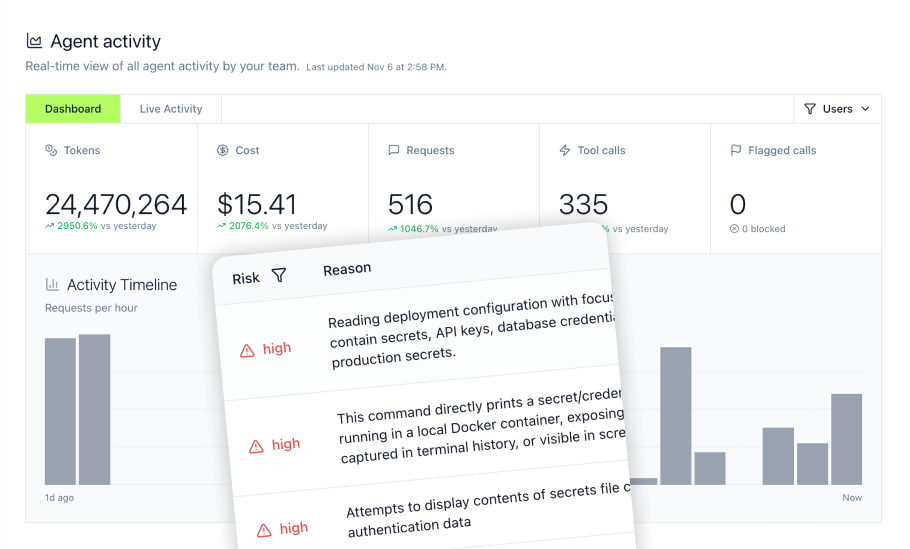
MintMCP's Agent Monitor provides real-time visibility into local agent activity beyond what LibreChat logs natively, including Bash commands, file reads and writes, and prompt submissions through supported developer-tool hooks. MintMCP Gateway separately governs and logs MCP traffic.
Implementing DLP and Security Policies
Data leakage prevention in AI systems requires checking both inputs and outputs:
- PII detection: Flag or block prompts containing social security numbers, credit card information, or other sensitive identifiers before they reach model APIs
- Credential scanning: Detect API keys, tokens, and passwords in responses before they appear in conversation logs
- Prompt injection defense: Identify attempts to manipulate agents into unauthorized actions through crafted inputs
MintMCP Gateway supports custom policy code execution on every tool call, enabling integration with existing DLP investments. Documented integration options include AWS Bedrock Guardrails, Google Cloud DLP, Microsoft Purview, Nightfall, and Skyflow. Pre- and post-phase hooks can transform, mask, or block content based on policy rules.
Advanced Governance: Custom Policies and Credential Management for LibreChat
At enterprise scale, governance moves beyond basic access control into custom policy enforcement and sophisticated credential management. This section covers the mechanisms available for organizations with advanced requirements.
Designing Custom Security Policies
LibreChat's native moderation handles basic content filtering, but enterprise policies often require:
- Custom rule engines: Block specific actions (DELETE commands, certain file paths) or require approval for sensitive operations
- Conditional access: Allow tool usage during business hours only, or require additional authentication for high-risk actions
- Workflow integration: Trigger alerts, create tickets, or notify administrators when policies are violated
MintMCP's Bundle architecture packages tool access, policy enforcement, and audit logging into single governance units. Each Bundle represents a use case (engineering team database access, sales team CRM access) with its own curated tool list, policy rules, and isolated audit trail. Bundles sync automatically with Okta and Azure AD group changes through SCIM, so permission changes in the identity provider flow through to AI tool access.
Managing Agent Identities and Credentials
When AI agents operate alongside employees, each agent needs its own identity:
- Independent credentials: Per-agent API keys and OAuth tokens that rotate without affecting other agents or human users
- Scoped permissions: Each agent receives only the access required for its function, not broad service account permissions
- Attribution in logs: Audit trails distinguish between actions taken by different agents, enabling investigation of specific automated workflows
MintMCP's Agent Bundles provide this capability through M2M (machine-to-machine) authentication. Each agent receives bearer API keys plus OAuth 2.0 client credentials that operate independently of human user accounts. The "act as agent" admin flow handles connectors that require per-agent OAuth authorization.
This approach addresses a common concern in enterprise AI deployments: when agents share credentials, tracking which agent performed which action becomes difficult, and revoking one agent's access requires changing credentials everywhere. Per-agent identity eliminates this problem.
Connecting LibreChat to Your Business: Integration Ecosystem and Use Cases
LibreChat's value increases when connected to business systems where work actually happens. The platform supports integrations through its MCP implementation and through custom API connections.
Expanding LibreChat's Reach with Integrations
LibreChat can connect to MCP servers configured by administrators or users. Depending on the servers added, examples may include:
Development tools:
- GitHub and GitLab for code repository access
- Linear and Jira for project management
- CI/CD pipeline integrations
Data sources:
- PostgreSQL, MySQL, MongoDB, and Redis
- ClickHouse and Snowflake for analytics workloads
- Elasticsearch for search and logging
Communication:
- Slack for team notifications and agent interaction
- Discord for community management
- Gmail for email automation
Cloud and storage:
- Google Drive and SharePoint for document access
- S3 for cloud storage operations
- Various cloud provider APIs
MintMCP extends this integration ecosystem with pre-configured and custom connectors, OAuth brokering, tool-level access controls, and managed connector hosting.
Practical Applications for Business Agents
Real-world LibreChat deployments typically focus on specific use cases:
Data analysis agents: Connect to Snowflake or BigQuery and query data through natural language to generate reports. Teams can use these agents to streamline recurring analysis tasks.
Customer support agents: Access CRM records and ticket history to draft responses or research customer issues. Agents can pull context from multiple systems that support staff would otherwise navigate manually.
Development workflow agents: Query GitHub for code context, create Jira tickets, trigger builds, and summarize pull request activity. Engineering teams use these for daily standups and project status updates.
Compliance research agents: Search internal document repositories for policy information, compare documents, and flag potential issues. Legal and compliance teams use RAG capabilities to query large regulation libraries.
The Future of AI Agents: LibreChat and the Model Context Protocol
LibreChat's integration with the Model Context Protocol positions it within a broader shift toward standardized agent infrastructure. Understanding this context helps organizations make decisions that remain relevant as the ecosystem evolves.
LibreChat and the Evolving Agent Ecosystem
The Model Context Protocol emerged as a standard for connecting AI agents to external tools and data sources. Since its introduction, MCP has gained adoption across major AI platforms:
- OpenAI, Anthropic, Google, and Microsoft all offer native MCP support
- Anthropic reported 97M+ monthly SDK downloads across MCP's Python and TypeScript SDKs in December 2025
- Governance transitioned to the Linux Foundation's Agentic AI Foundation in December 2025
This standardization means LibreChat's MCP integrations work with tools and data sources that are also compatible with Claude, Cursor, ChatGPT, Gemini, and other MCP-supporting platforms. Organizations investing in MCP-based infrastructure create assets that transfer across AI tools rather than being locked to a single platform.
MintMCP's Role in Agent Infrastructure
As AI moves from single-purpose chatbots toward autonomous agents working alongside employees, the governance layer becomes increasingly important. MintMCP operates as both an MCP Gateway for governed data and tool connections and an Agent Gateway for agent identities, permissions, and monitoring.
The MCP Gateway handles what LibreChat needs today: authenticated access to data sources, tool-level access control, and audit logging for every MCP call. The Agent Gateway handles what becomes relevant as organizations deploy more autonomous agents: persistent agent identities, scoped credentials, long-term memory, and visibility into agent activity across the organization.
For organizations building on LibreChat, MintMCP provides the security governance layer that enterprise deployments require without forcing a platform change. The same governance infrastructure that secures LibreChat today extends to other MCP-supporting platforms as teams adopt additional AI tools.
Why Choose an Open-Source Solution Like LibreChat for Large Language Models?
The decision between LibreChat and commercial alternatives depends on organizational context, including team size, technical capacity, compliance requirements, and long-term AI strategy.
Advantages of Open-Source LLMs for Enterprises
Open-source licensing changes the cost structure: LibreChat has no per-seat software license fee, while ChatGPT Enterprise uses organization-level contracted pricing. LibreChat deployments still incur infrastructure, model API, support, security, and operational costs, so savings depend on the specific deployment.
Data sovereignty matters in some contexts: Regulated organizations may restrict which external services can process sensitive data. HIPAA does not prohibit cloud or external processing when the required safeguards and business associate agreements are in place. Self-hosted LibreChat with local models can keep application data and model inference on-premises.
Vendor independence protects against platform risk: Organizations relying entirely on one AI provider face pricing changes, feature deprecation, or service disruptions with no alternatives. Multi-provider platforms create optionality.
Customization enables differentiated workflows: Commercial platforms serve broad markets with standardized features. Open-source platforms let organizations build custom agents, modify interfaces, and integrate with internal systems in ways commercial vendors do not support.
Community Best Practices for LibreChat Deployment
Organizations successfully running LibreChat at scale share several patterns:
- Start with Docker Compose, then scale horizontally when needed: Docker Compose is recommended for straightforward deployments. Multiple instances can use Redis and a load balancer for shared streams and coordination.
- Use Redis for scaled deployments: Redis is most relevant for multiple LibreChat instances, resumable streams, caching, and shared state. A single instance may not require it.
- Use
librechat.yamlfor advanced configuration: Environment variables handle basic setup, but YAML configuration files enable rate limiting, model restrictions, and agent capabilities that production deployments need. - Test updates in staging: LibreChat releases frequently and advises operators to review the changelog for breaking changes before updating.
- Add governance before broad production rollout: Larger or regulated deployments benefit from centralized authentication, cross-client access control, and audit logging through an MCP gateway.
Building Production-Ready AI Infrastructure with LibreChat and MintMCP
LibreChat provides the foundation for enterprise AI chat and agent workflows, while MintMCP extends that foundation with the governance layer production deployments require. Organizations deploying LibreChat at scale typically need three capabilities beyond what the platform provides natively: centralized authentication across multiple AI clients, tool-level access control with auditable policy enforcement, and persistent agent identities with scoped credentials.
MintMCP's MCP Gateway addresses the first two requirements by providing authenticated access to data sources, tool-level permissions managed through identity provider groups, and structured audit logs for every MCP call. This means the same database connector, API integration, or internal tool can be governed consistently whether teams access it through LibreChat, Claude Desktop, Cursor, or other MCP clients.
As organizations move from chat interfaces to autonomous agents that work alongside employees, the Agent Gateway layer becomes critical. Persistent agent identities enable per-agent credentials that can be independently rotated and revoked without affecting other agents or human users. Scoped memory lets agents maintain context across sessions while keeping sensitive information properly segregated. Real-time monitoring through Agent Monitor surfaces local agent activity that doesn't flow through MCP, including Bash commands, file operations, and prompt submissions.
This architecture creates a production-ready AI infrastructure where LibreChat serves as the user-facing chat and agent interface, MCP Gateway governs data and tool connections, and Agent Gateway handles agent lifecycle, identity, and observability. Organizations can deploy LibreChat today with MintMCP's governance layer, then extend the same infrastructure to other AI clients as their needs evolve without rebuilding authentication, access control, or audit systems.
Frequently Asked Questions
Can LibreChat run entirely on-premises without any external API calls?
Yes. LibreChat can connect to local models through Ollama, allowing a fully local configuration when all supporting services and models remain on-premises. Hardware requirements vary widely based on model size, quantization, context length, and expected concurrency. The setup involves deploying LibreChat, running Ollama, and configuring LibreChat to use the local endpoint rather than an external model API.
How does LibreChat handle conversation history for compliance purposes?
LibreChat stores conversation histories in MongoDB and produces backend application logs. It can also emit OpenTelemetry traces for server, database, Redis, and outbound HTTP visibility. These operational data sources do not form a complete compliance audit trail by themselves. Organizations with formal requirements must deliberately configure retention, encryption, access controls, backups, and external audit exports around the deployment.
What happens to my LibreChat deployment if the project is abandoned?
LibreChat is MIT licensed, meaning the source code remains available and organizations can continue operating existing deployments indefinitely regardless of project status. ClickHouse stated that existing LibreChat deployments would continue unchanged with ongoing investment in the open-source project and community. The MIT license also permits forking, so the community could continue development independently if needed. Organizations concerned about long-term support should maintain internal documentation of their deployment configuration and consider commercial support options for mission-critical deployments.
How do I migrate existing ChatGPT conversation history to LibreChat?
LibreChat includes a built-in importer for ChatGPT conversation exports. Export your ChatGPT data, extract the conversations.json file, then open LibreChat and select Settings, Data Controls, and Import. The documented importer covers conversation history rather than Custom GPT configurations, so specialized GPT instructions and tools may need to be recreated as LibreChat Agents.
Can multiple LibreChat instances share the same authentication system?
Yes. LibreChat's SSO integration supports OAuth2, SAML, and LDAP, allowing multiple instances to authenticate against a single identity provider like Azure AD or Okta. This enables deployment patterns where different teams or business units run separate LibreChat instances (with different model configurations or data sources) while maintaining unified user management. Each instance requires its own OAuth client registration in the identity provider, but users sign in with the same credentials across all instances.
What is the difference between LibreChat's built-in Agents and external AI agent frameworks?
LibreChat's Agents are tightly integrated assistants that run within the LibreChat interface, supporting code execution, file search, MCP tool integration, and RAG capabilities. External agent frameworks like LangChain or AutoGPT are general-purpose libraries for building autonomous agents that may or may not use a chat interface. LibreChat Agents are simpler to configure (no code required for basic setups) but less flexible than framework-based agents. For organizations that need both, LibreChat can serve as the user interface while external agents handle complex multi-step workflows, with the two connecting through MCP or API calls.