Connecting AI agents to Google Workspace data without proper governance creates a security gap that grows with every new deployment. As 86% of enterprises require tech stack upgrades to properly deploy AI agents, organizations need platforms that provide centralized authentication, audit logging, and policy enforcement for Gmail, Drive, Calendar, and other Workspace applications.
The right governance platform transforms Google Workspace from a productivity suite into an AI-accessible data platform while maintaining the security and observability that enterprise teams demand. Without this governance layer, organizations face fragmented security policies, zero visibility into which agents access which tools, and duplicated authentication logic across dozens of individual connections.
Key Takeaways
- MintMCP provides enterprise MCP Gateway for governed data and tool connections plus Agent Gateway for agent identities, permissions, memory, and monitoring across Google Workspace deployments
- Google Workspace Studio offers workflow automation for teams staying within the Google ecosystem
- Gemini Enterprise Agent Platform enables custom agent development with Google-managed infrastructure
- Google Agent Gateway delivers network-level governance through Google Cloud infrastructure
- Platform choice depends on deployment speed requirements, security obligations, authentication architecture, and integration ecosystem needs
1. MintMCP: enterprise Google Workspace governance with MCP Gateway and Agent Gateway
MintMCP provides enterprise governance for AI agents accessing Google Workspace through two connected layers: MCP Gateway for governed data and tool connections, and Agent Gateway for agent identities, permissions, memory, and monitoring.
MCP Gateway: governed data connections
MintMCP Gateway provides enterprise infrastructure for Model Context Protocol focused on authentication, tool-level access control, credential management, logging, rule-based policy, and agent governance. Its data-permissions-first architecture starts with SSO, SCIM-driven RBAC, IdP groups, Virtual MCP Bundles, tool-level policy, and audit logs.
MintMCP solves the fundamental problem that 42% of enterprises face when needing access to 8 or more data sources for AI agent deployment. The platform's architecture wraps stdio, hosted, HTTP-streamable, and SSE MCP servers behind SSO-fronted remote MCP endpoints with OAuth brokering, SCIM-driven membership, and rule-based policy.
For Google Workspace specifically, MintMCP provides:
- OAuth configuration for Gmail, Drive, Calendar, and other Workspace APIs with centralized credential management
- Role-based access controls limiting which agents can read versus write to Workspace data
- Complete audit trails capturing every tool call, prompt, and response
- Virtual MCP Bundles that create team-specific endpoints exposing only the minimum required Google Workspace tools
Agent Gateway: agent identities and governance
Beyond data connections, MintMCP Agent Gateway provides the control layer for agents that work alongside users. This includes:
- Agent Bundles: Give internal agents first-class identities with M2M auth, scoped tools, independent rotation and revocation, and an "act as agent" flow for connectors requiring per-agent OAuth
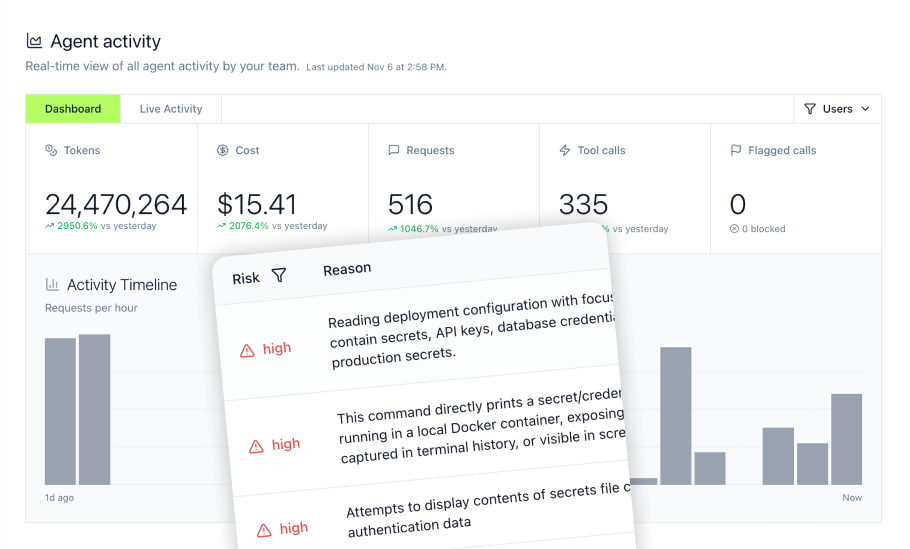
- Agent monitoring: Track which teams and agents use which tools, when they access data, and how frequently through Agent Monitor
- Memory and context: Provide agents with scoped memory that follows company ownership, version control, and audit principles
- Permissions management: Define granular tool access by role with read-only operations for analysts while restricting write tools to authorized administrators
Core capabilities
- Hosted MCP Connectors: MintMCP runs connector instances with auto-scaling and sandboxed execution per connector, reducing infrastructure overhead for Google Workspace integration
- OAuth Brokering: Add enterprise authentication to local and hosted MCP servers, including OAuth 2.x, bearer tokens, headers, and SSO-fronted access
- Real-Time Monitoring: Live dashboards showing server health, usage patterns, tool call tracking, and security alerts across all Google Workspace connections
- Granular Access Control: Configure tool access by role with appropriate permissions for each organizational function
Google Workspace integration details
MintMCP supports Google Workspace setup with pre-configured connectors for Gmail, Google Calendar, Google Drive, Google Docs, Sheets, and Slides.
Security and compliance
MintMCP is SOC 2 Type II audited, compliant with HIPAA standards, and penetration tested. Every agent action is logged with full context: who initiated it, which tools were called, what data flowed through, and when. Customers can visit the Trust Center at trust.mintmcp.com or contact security@mintmcp.com for compliance documentation.
Deployment
Deploy quickly with managed SaaS-first delivery in US and EU availability, hosted MCP connectors, pre-configured policies, and self-service access for developers. VPC and self-hosted deployment are available on request.
Contact MintMCP for enterprise demonstration and pricing.
2. Google Workspace Studio
Google Workspace Studio provides no-code automation included with supported Google Workspace Business and Enterprise plans. The platform uses natural language through Gemini to describe workflows and generate automation flows with Workspace connectors and scheduling logic.
Primary focus
Workspace Studio targets teams wanting quick automation within the Google ecosystem. Users can describe desired workflows in plain language, and the platform generates automation flows connecting Gmail, Calendar, Drive, and select third-party applications.
Core capabilities
- Natural language workflow creation via Gemini
- Pre-configured connectors for Google Workspace applications
- Third-party integrations, including supported business applications, with availability subject to Workspace Studio rollout and limited-preview status
- Workflow scheduling and event triggers
- Admin controls and support based on the organization's Google Workspace edition and support plan
Setup timeline
Basic Workspace-native flows can be created quickly once Workspace Studio is enabled for a supported edition. Actual rollout time depends on admin enablement, connector availability, OAuth approvals, and whether limited-preview third-party integrations are required.
Where Workspace Studio fits
Organizations already invested in Google Workspace who need automation without multi-LLM requirements. Teams seeking quick wins before scaling to enterprise governance platforms.
Tradeoffs to consider
Workspace Studio operates within the Google ecosystem with Gemini as the only AI model option. Organizations requiring Claude, ChatGPT, or multi-cloud governance will need to evaluate platforms with broader LLM support. Workspace Studio inherits applicable Google Workspace admin and DLP controls. However, third-party integrations remain in limited preview, and broader DLP integration for third-party services is not currently available.
3. Gemini Enterprise and Gemini Enterprise Agent Platform
Gemini Enterprise provides enterprise search and actions over Gmail, Google Calendar, Google Drive, and other connected data sources. Gemini Enterprise Agent Platform provides ADK, Agent Runtime, Google-managed MCP servers, Agent Gateway, and related services for building and governing custom agents.
Primary focus
This platform targets development teams building custom agent logic with advanced reasoning capabilities who want to stay within the Google ecosystem. The platform provides development environments for agents requiring complex multi-step workflows.
Core capabilities
- Agent development framework available in Python, TypeScript, Go, and Java
- Google-managed remote MCP servers for supported Google and Google Cloud services
- Gemini Enterprise data stores and connectors for federated search and actions across Gmail, Google Calendar, and Google Drive
- Advanced reasoning capabilities for multi-step workflows
- Integration with Google Cloud services
Setup timeline
A basic ADK agent can be created through Google's quickstart workflow, but production timelines depend on agent complexity, data connectors, identity configuration, evaluation, deployment architecture, and security review.
Where Gemini Enterprise fits
Organizations with software developers building custom agent logic who want deep integration with Google Cloud services and managed MCP infrastructure within the Google ecosystem.
Tradeoffs to consider
ADK requires software-development resources for agent creation and maintenance. However, it is not Python-only, and the broader Agent Platform supports Google, partner, and open-weight models. The main tradeoff is Google Cloud implementation complexity rather than a blanket lack of language or model choice.
4. Google Agent Gateway
Google Agent Gateway provides network-level governance through Identity-Aware Proxy (IAP) and Model Armor integration for organizations deeply invested in Google Cloud infrastructure.
Primary focus
Agent Gateway delivers centralized policy enforcement for agent traffic using Google Cloud networking capabilities. The platform supports two deployment modes: Client-to-Agent ingress for external agent access and Agent-to-Anywhere egress for outbound agent communications.
Core capabilities
- IAP-backed authorization policies for Agent-to-Anywhere egress, with audit-only dry-run and enforcement modes; IAP is not supported for Client-to-Agent ingress
- Model Armor integration for prompt injection protection
- Agent Registry for cataloging agents, MCP servers, and API endpoints
- Private Service Connect (PSC) for private egress to internal services
- Cloud Audit Logs for compliance and security monitoring
Setup timeline
Initial setup requires enabling the relevant APIs, configuring Agent Registry, creating an Agent Gateway resource, assigning IAM policies, and connecting the applicable agent runtime or Gemini Enterprise application. Production rollout time depends on networking, identity, Model Armor, private connectivity, and policy requirements.
Where Google Agent Gateway fits
Organizations deeply invested in Google Cloud with networking expertise who require network-level governance, Private Service Connect for private egress, and integration with Google Cloud's security ecosystem.
Tradeoffs to consider
Agent Gateway requires Google Cloud IAM, Agent Registry, networking, and policy expertise. It can be configured through the Google Cloud Console, APIs, or gcloud workflows, while Terraform remains an optional infrastructure-as-code approach rather than a requirement.
5. Boomi MCP and Agentstudio
Boomi MCP provides a governed catalog and policy layer for MCP assets, while Agentstudio provides agent design, orchestration, and lifecycle management. Boomi's broader platform can expose 1,000+ connectors and recipes as MCP tools, but these should not be described as native Agentstudio application connectors.
Primary focus
This platform targets organizations requiring unified governance across multiple cloud environments and enterprise applications. The platform provides centralized policy enforcement for agents accessing data across diverse SaaS and on-premises systems.
Core capabilities
- Boomi MCP support for exposing 1,000+ connectors and recipes as governed MCP tools
- Agent Control Tower governance and monitoring for Boomi and registered third-party agents
- Application, MCP, API Control Plane, and integration tools for connecting agents to enterprise systems
- Custom enterprise pricing with implementation services
Setup timeline
Boomi implementation time depends on the number of agents, integrations, MCP servers, identity systems, and governance policies involved. Large deployments may also involve Boomi professional services or an implementation partner.
Where Boomi fits
Large enterprises managing AI agents across multiple clouds and enterprise applications who need unified governance rather than platform-specific solutions.
Tradeoffs to consider
This platform's enterprise-scale capabilities come with corresponding implementation complexity. Organizations with simpler requirements focused primarily on Google Workspace may find dedicated MCP platforms more appropriate for their use case.
6. Strac DLP Gateway
Strac provides a security-focused MCP DLP gateway that intercepts every tool call and redacts sensitive data inline before reaching AI models. The platform addresses compliance requirements for organizations handling PII, PHI, and other regulated data.
Primary focus
Strac targets compliance-focused deployments in healthcare, financial services, and other regulated industries. The gateway provides detection and redaction of sensitive data including SSNs, medical record numbers, API keys, and credentials.
Core capabilities
- Inline PII/PHI redaction before data reaches AI models
- Compliance framework mapping for SOC 2, HIPAA, PCI DSS, and GDPR
- Real-time alerts and blocking for sensitive data exposure
- Complete audit trails for compliance investigations
- Policy templates for regulated industries
Setup timeline
Strac describes some agentless MCP deployments as taking under 10 minutes, but Google Workspace rollout time depends on tenant authorization, OAuth consent, connector scope, and policy configuration:
- Authorize with Google Workspace tenant via OAuth
- Configure MCP proxy endpoint in AI client
- Select appropriate compliance policy template
Where Strac fits
Organizations in regulated industries requiring DLP enforcement for AI agents accessing Google Workspace data with sensitive data redaction.
Tradeoffs to consider
Strac focuses specifically on data loss prevention rather than broader MCP governance capabilities. Organizations requiring Virtual MCP Bundles, per-agent identity, SCIM-driven RBAC, and hosted connector runtime should evaluate platforms providing comprehensive governance alongside DLP.
Implementation roadmap for Google Workspace agent platforms
Phase 1: Pilot deployment
Begin with a limited scope deployment for 10-50 users accessing 3-5 carefully selected Google Workspace applications. Choose low-risk use cases like internal knowledge base search or calendar management. This phase validates architecture, identifies integration challenges, and establishes baseline metrics.
Key activities:
- Configure OAuth credentials for Gmail, Drive, and Calendar APIs
- Set up role-based access controls limiting agent permissions
- Enable audit logging and use monitor-only or audit-only policy modes where supported to observe traffic patterns
- Validate that logs capture expected data for compliance requirements
Phase 2: Governance framework
Establish policies for server vetting and approval, define role-based access controls aligned with organizational structure, implement monitoring and alerting for security events, and document operational procedures. Create a governance council including security, legal, and business stakeholders.
Key activities:
- Define which agents access which Google Workspace data
- Configure tool-level permissions (read-only versus write access)
- Set up approval workflows for high-risk operations
- Enable DLP integration for sensitive data detection
Phase 3: Enterprise rollout
Expand to additional teams and use cases based on pilot success metrics. Integrate with enterprise identity providers for SSO enforcement. Connect production data sources and enable self-service access for developers while maintaining centralized governance.
Key activities:
- Roll out to all target users with SCIM-driven group membership
- Switch from dry-run to enforce mode for policies
- Monitor for permission errors and adjust policies based on feedback
- Establish quarterly policy reviews and vendor API monitoring
Business use cases and ROI
Customer response automation
Support teams can spend substantial time searching Gmail threads, Drive documents, and Calendar history to respond to customer inquiries. With a governed platform, AI agents search emails, draft responses, and verify against Drive knowledge bases within approved workflows.
Organizations should measure response time, handling time, escalation rates, and grounded-answer accuracy during a controlled pilot. Results vary based on data quality, workflow design, permissions, adoption, and the review process applied to agent-generated responses.
Meeting intelligence and scheduling
Sales teams manually prepare for meetings by searching emails, checking Drive files, and coordinating calendars. With governed Google Workspace integration, AI agents check Calendar for upcoming meetings, pull attendee lists, search Gmail for email history, and retrieve linked Drive files to generate pre-meeting briefs.
This workflow can reduce manual meeting preparation and give sales teams more consistent access to relevant context. Organizations should measure preparation time, brief accuracy, adoption, and conversion outcomes within their own pilot rather than assuming a universal improvement.
Compliance and data governance
Healthcare organizations need AI agent deployments designed to support their HIPAA privacy, security, access-control, and audit obligations when accessing patient information in Google Workspace. DLP integration intercepts every tool call, redacts protected health information inline before reaching AI models, and logs every access for HIPAA audit trail requirements.
This can reduce the amount of detected PII/PHI that reaches model context while maintaining audit documentation. It should not be presented as a guarantee of zero sensitive-data exposure because results depend on connector coverage, policy configuration, file types, OCR, and detection accuracy.
Choosing the right platform for your organization
Deployment speed versus control
Purpose-built platforms like MintMCP provide fast managed SaaS-first deployment with hosted MCP connectors and pre-configured governance controls. Self-hosted options require infrastructure setup but offer full control. Consider whether you need production deployment quickly or can invest in building custom infrastructure.
Security and compliance requirements
Organizations in regulated industries should evaluate controls against the NIST AI Risk Management Framework. In the cited enterprise survey, security concerns were reported by 53% of leadership respondents and 62% of practitioners, while data governance was cited by 40% and 49%, respectively. Audit logs, SSO, SCIM-driven RBAC, credential management, and tool-level access controls matter for healthcare, finance, and enterprises handling sensitive data.
Authentication architecture
The MCP authorization specification for HTTP transports is based on selected OAuth 2.1 conventions, while authorization remains optional. Stdio implementations generally obtain credentials from their environment, so authentication behavior still varies by deployment. Enterprise identity design should also follow resource-focused principles such as those in the NIST Zero Trust Architecture. Some platforms broker OAuth and wrap servers with enterprise SSO, while others require manual configuration per server. Consider whether you need shared service accounts, per-user authentication, or per-agent identity depending on your use cases.
Observability and monitoring
Without comprehensive logging, organizations face a visibility gap where they cannot see which tools agents use or track data access. Essential metrics include tool call tracking, performance analytics, error rates, and cost allocation. Evaluate whether your platform provides real-time dashboards, audit logs, and centralized observability.
Integration ecosystem
Assess which Google Workspace applications your AI agents need to access. If requirements include Gmail, Calendar, Drive, Docs, Sheets, and Slides, verify your platform supports these integrations with appropriate OAuth scopes and role-based permissions without extensive custom development.
Why MintMCP for Google Workspace agent governance
Deploying AI agents to Google Workspace without proper governance creates security gaps that compound with each new integration. MintMCP addresses this through two connected layers that work together to provide comprehensive control.
MCP Gateway handles the data and tool connection layer. It wraps Google Workspace APIs behind SSO-fronted remote MCP endpoints with OAuth brokering, SCIM-driven membership, and rule-based policy. Organizations gain centralized credential management, audit trails for every tool call, and Virtual MCP Bundles that expose only the minimum required tools to each team. This eliminates fragmented security policies and duplicated authentication logic across individual connections.
Agent Gateway builds on this foundation to provide the control layer for agents that work alongside users. Agent Bundles give internal agents first-class identities with M2M auth, scoped tools, and independent rotation and revocation. Agent Monitor tracks which teams and agents use which tools, when they access data, and how frequently. Organizations gain visibility into agent behavior, memory scoped to team and organizational boundaries, and permissions that follow the principle of least privilege.
MintMCP's hosted MCP connectors, pre-configured policies, and managed SaaS-first delivery enable teams to start with a pilot deployment connecting Gmail and Calendar, establish governance based on real usage patterns, then scale across the organization with confidence that every agent action is logged, every tool call is authorized, and every data access is auditable.
Visit mintmcp.com/mcp-gateway to start your free trial.
Frequently asked questions
What is an AI agent gateway and why do I need one for Google Workspace?
An AI agent gateway serves as a secure intermediary between AI assistants like Claude, ChatGPT, Gemini, Cursor, and Copilot and your Google Workspace data. Without a governance platform, organizations face fragmented security policies across individual connections, zero visibility into which agents access which Workspace applications, and duplicated authentication logic. The gateway provides a centralized enterprise control plane for authentication, authorization, audit logging, and policy enforcement across MCP implementations. MCP itself defines optional authorization for HTTP transports, but it does not provide organization-wide governance, centralized audit administration, or unified policy management.
How does MintMCP ensure data privacy when AI agents access Google Workspace?
MintMCP implements defense-in-depth security through centralized governance, SSO enforcement, SCIM-driven RBAC, tool-level policy, credential management, and observability controls. Every agent action is logged with full context: who initiated it, which tools were called, what data flowed through, and when. MintMCP is SOC 2 Type II audited, compliant with HIPAA standards, and penetration tested. Customers handling protected health information can request HIPAA documentation and MintMCP signs BAAs.
Can MintMCP integrate with custom Google Apps Script solutions?
MintMCP supports custom MCP server deployment for internal tools and APIs through Admin MCP and hosted CLI. Organizations can deploy custom connectors that integrate with existing Google Apps Script workflows while maintaining centralized governance. The platform's OAuth brokering adds enterprise authentication to custom servers without rebuilding each integration.
What kind of AI agent activity within Google Workspace can MintMCP monitor?
MintMCP provides two-layer governance through MCP Gateway and Agent Monitor. MCP Gateway covers MCP traffic including tool calls, prompts, and responses with full user attribution. Agent Monitor covers local non-MCP agent activity including Bash commands, file reads and writes, and prompt submissions via Claude Code and Cursor hooks. Organizations gain visibility into which teams and agents use which tools, when they access data, and how frequently.
Is it difficult to set up MintMCP with an existing Google Workspace environment?
MintMCP provides managed SaaS-first delivery with hosted MCP connectors and pre-configured policies. Organizations can start with a limited pilot connecting a defined group of users to Gmail, Calendar, and Drive. Pilot duration depends on Google Workspace admin authorization, OAuth scopes, security review, policy testing, and the number of participating teams. The platform handles OAuth configuration, credential management, and server hosting. Teams can configure Agent Monitor rules in flag-only mode to observe traffic patterns before enabling blocking or approval actions, reducing risk during rollout.