Connecting AI agents to Microsoft 365 creates a governance challenge most organizations underestimate. When your sales team deploys 12 AI agents that read customer emails, can you prove to an auditor which Outlook accounts each agent accessed? Can you rotate credentials for one agent without disrupting others?
As 86% of enterprises require tech stack upgrades to properly deploy AI agents, the gap between "AI works in demo" and "AI works in production" often comes down to governed access to enterprise systems like Microsoft 365. MintMCP Gateway solves this by centralizing authentication, tool-level access control, and audit logging for every agent connecting to Outlook, Teams, SharePoint, and other Microsoft 365 services.
The right gateway transforms N×M credential sprawl (every agent × every Microsoft 365 tool) into a single governed control plane where security teams maintain visibility while engineering teams ship faster.
Key Takeaways
- MintMCP positions around two categories: MCP Gateway provides governed data and tool connections through authentication, tool-level access control, and credential management. Agent Gateway builds on that foundation with agent identities, permissions, memory, and monitoring for agents that work alongside users. For Microsoft 365, Virtual MCP Bundles create per-use-case endpoints, Agent Bundles provide per-agent identity, and inline DLP integration works with Microsoft Purview
- Microsoft Agent 365 integrates with the Microsoft stack through the Work IQ MCP server, Entra ID authentication, and Defender and Purview integration with Microsoft 365 admin center visibility
- Platform options span deployment models from managed SaaS-first delivery to VPC, on-premises, and multi-cloud control planes for organizations with workloads across Azure, AWS, and GCP
- Open-source gateways provide infrastructure control with low gateway overhead for performance-focused teams, while some require custom Microsoft 365 server development
- Integration approaches range from purpose-built MCP gateways to native remote MCP support in existing Azure infrastructure
- Multi-gateway federation addresses distributed regional deployments with coordinated policy under open-source licensing
1. MintMCP Gateway: enterprise Microsoft 365 governance in minutes
MintMCP Gateway provides governed data and tool connections for AI systems through authentication, tool-level access control, credential management, logging, and rule-based policy. Its Agent Gateway builds on that foundation with identities, permissions, memory, and monitoring for agents that work alongside users. The platform's data-permissions-first architecture starts with SSO, SCIM-driven RBAC, IdP groups, Virtual MCP Bundles, tool-level policy, and audit logs, then enables agents on top.
For Microsoft 365 integration, MintMCP wraps Outlook email and calendar, Teams, OneNote, and SharePoint files access behind SSO-fronted remote MCP endpoints with OAuth brokering, SCIM-driven membership, and rule-based policy. This addresses the fundamental problem that 42% of enterprises face when needing access to 8 or more data sources for AI agent deployment.
What makes MintMCP Gateway different
MintMCP solves the Microsoft 365 governance problem through its Bundle architecture. Instead of managing scattered OAuth apps with no audit trail, Virtual MCP Bundles create per-use-case endpoints where sales teams see CRM-related Microsoft 365 tools while engineering teams access different governed endpoints. Each Bundle ties SCIM group membership to curated tool lists, custom policy rules, and isolated audit trails.
Core capabilities
- Hosted MCP Connectors: MintMCP runs connector instances with auto-scaling and sandboxed execution per connector, reducing infrastructure overhead for Microsoft 365 integration
- OAuth Brokering: Add enterprise authentication to Microsoft 365 MCP servers including OAuth 2.x, bearer tokens, headers, and SSO-fronted access without rebuilding each server
- Virtual MCP Bundles: Create team-specific Microsoft 365 endpoints that expose only minimum required tools with SCIM-driven membership and fine-grained role-based access
- Agent Bundles: Give internal agents first-class identities with M2M auth, scoped Microsoft 365 tools, independent rotation and revocation
- Custom Gateway Middleware: Runs customer-authored middleware in a JS sandbox with external DLP integrations including Microsoft Purview for masking, blocking, and policy enforcement
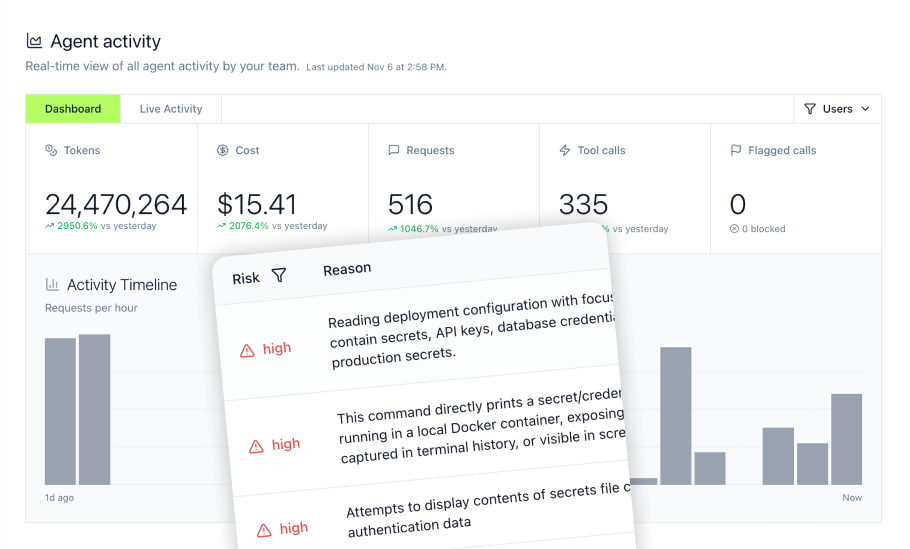
- Real-Time Monitoring: Live dashboards showing Microsoft 365 tool call tracking, usage patterns, and security alerts
Microsoft 365 governance architecture
MintMCP provides two-layer governance for Microsoft 365 environments. The MCP Gateway covers MCP traffic to Outlook email and calendar, Teams, OneNote, and SharePoint files. Agent Monitor covers local non-MCP agent activity including Bash commands, file reads/writes, and prompt submissions via Claude Code and Cursor hooks. This addresses security concerns reported by 53% of leaders and 62% of practitioners involved in enterprise AI agent deployment.
Enterprise compliance
MintMCP is SOC 2 Type II audited with continuous compliance monitoring via Drata. Organizations handling protected health information can request documentation showing MintMCP is compliant with HIPAA standards, and MintMCP signs BAAs. The platform exports audit logs to SIEM platforms including Microsoft Sentinel for unified Microsoft 365 security monitoring.
Deployment
Managed SaaS-first delivery with US and EU availability. VPC and self-hosted deployment available on request.
Pricing
Contact for enterprise demonstration and pricing.
Getting started
Visit mintmcp.com/mcp-gateway for the deployment guide.
2. Microsoft Agent 365
Microsoft Agent 365 provides native Microsoft stack integration for organizations invested in the Microsoft 365 ecosystem. The platform includes an agent registry, Entra ID integration, and a Work IQ MCP server for Microsoft 365 access.
Primary focus
Microsoft Agent 365 targets organizations where Microsoft 365 is the center of gravity for productivity tools. The platform leverages existing Entra ID deployments for authentication and connects to Microsoft Defender for audit log queries and Microsoft Purview for DLP, sensitivity labels, and eDiscovery.
Core capabilities
- Work IQ MCP Server: A single MCP endpoint with generic tools and resource paths for Microsoft 365 entities, authenticated through Microsoft Entra ID and governed by tenant policy
- Entra ID Authentication: SSO through existing Microsoft identity infrastructure
- Microsoft 365 Admin Center: Centralized agent registry and visibility within Microsoft admin tools
- Defender Integration: Advanced Hunting for audit log queries across agent activity
- Purview Integration: DLP, sensitivity labels, and compliance controls
Where Agent 365 fits
Organizations standardized on Microsoft 365, Entra ID, and Microsoft Purview who want integration within Microsoft's existing admin and compliance tools.
Tradeoffs to consider
Agent 365 uses per-user licensing at $15/user/month for standalone or $99/user/month as part of the E7 bundle. Microsoft Agent 365 is now generally available, with public pricing for both the standalone Agent 365 plan and the Microsoft 365 E7 bundle. Organizations with multi-cloud workloads or requirements beyond Microsoft 365 may need to evaluate whether the Microsoft-native approach covers their full agent governance needs.
Deployment
Microsoft cloud, with regional availability and data handling determined by the organization's Microsoft 365 tenant configuration and applicable service terms.
Pricing
$15/user/month standalone; $99/user/month as part of Microsoft 365 E7 bundle.
3. TrueFoundry
TrueFoundry provides a multi-cloud control plane with SaaS, VPC, and on-premises deployment options. The platform targets organizations with workloads spanning Azure, AWS, and GCP who need unified agent governance across cloud providers.
Primary focus
TrueFoundry addresses organizations where Microsoft 365 is one of several enterprise systems requiring agent governance. The platform emphasizes deployment flexibility with options for SaaS, customer VPC, and on-premises installation for data sovereignty requirements.
Core capabilities
- Managed Microsoft 365 MCP Server: TrueFoundry provides a managed connector for Outlook email, Calendar, OneDrive, SharePoint, and Teams with governed per-user OAuth access
- Multi-Deployment Options: SaaS, customer VPC, or on-premises deployment based on data sovereignty needs
- Identity Provider Integration: Entra ID SSO via SAML/OIDC alongside other enterprise identity providers
- MCP Server Registry: Register custom MCP servers or use managed connectors
- Agent Harness: Managed runtime with sandbox execution, approval gates, and skills registry
Where TrueFoundry fits
Platform engineering teams with multi-cloud workloads who need VPC-only or on-premises deployment for data sovereignty. Organizations using TrueFoundry for LLM management who want to extend to Microsoft 365 agent governance.
Tradeoffs to consider
TrueFoundry provides a managed Microsoft 365 MCP server, so custom server development is not required for standard Outlook, Calendar, OneDrive, SharePoint, and Teams access. Teams should instead compare governance depth, deployment requirements, and agent identity controls.
Deployment
SaaS, customer VPC, or on-premises installation.
Pricing
Tiered by deployment model; contact for pricing.
4. Bifrost
Bifrost provides an open-source Go-based MCP gateway focused on performance. The project targets DevOps teams who want infrastructure control with minimal licensing costs.
Primary focus
Bifrost emphasizes raw performance with approximately 11µs gateway overhead. The platform targets teams comfortable operating Kubernetes or Docker infrastructure who want open-source control over their MCP gateway layer.
Core capabilities
- Low Latency: Approximately 11µs gateway overhead for performance-critical deployments
- Go Implementation: Single binary deployment for operational simplicity
- Open-Source Core: Open-source core with full infrastructure control; additional enterprise capabilities are offered separately
- Container Deployment: Docker for development, Kubernetes for production
Where Bifrost fits
Performance-first DevOps teams who can configure external or custom Microsoft 365 MCP servers and have the infrastructure capacity to operate their own gateway. Organizations prioritizing open-source tooling and willing to invest DevOps resources.
Tradeoffs to consider
Microsoft 365 integration requires configuring an external or custom MCP server for the Microsoft 365 services you need. Operational effort depends on the chosen server, deployment architecture, authentication model, scaling requirements, and support expectations.
Deployment
Self-hosted via Docker or Kubernetes.
Pricing
Open-source core; enterprise capabilities, infrastructure, and operating costs vary.
5. Azure API Management
Azure API Management includes native remote MCP support for organizations standardized on Azure infrastructure. Teams can expose REST APIs as MCP servers or govern existing MCP servers within their current API gateway infrastructure.
Primary focus
Azure API Management targets organizations standardized on Azure infrastructure who want to reuse existing API gateway investments rather than deploy separate MCP-specific infrastructure.
Core capabilities
- Native Remote MCP Support: Expose managed REST APIs as MCP servers and govern existing remote MCP servers
- Entra ID Integration: Authentication through existing Azure identity infrastructure
- Key Vault: Secure credential management through Azure Key Vault
- Azure Monitor: Performance metrics and observability through Azure monitoring
- Tier-Based Pricing: Multiple fixed-price and consumption-based service tiers
Where Azure APIM fits
Azure-native organizations with existing API Management expertise who want to add MCP support without deploying separate gateway infrastructure. Teams using API Management for API governance who want unified management.
Tradeoffs to consider
Azure API Management supports remote MCP servers but has feature limitations. MCP servers exposed from managed REST APIs support tools but not resources or prompts, external MCP servers do not currently support prompts, and MCP capabilities are not supported in workspaces. Teams also need Azure API Management expertise to configure policies, identity, and monitoring.
Deployment
Azure cloud with hybrid options.
Pricing
Pricing varies by service tier, capacity, region, deployment model, and request volume.
6. IBM ContextForge
IBM ContextForge provides open-source multi-gateway federation under the Apache 2.0 license. The project targets multinational enterprises with distributed regional deployments requiring local gateway performance.
Primary focus
ContextForge addresses organizations with geographically distributed operations who need multiple gateway instances with coordinated policy and federated identity. The platform targets enterprises with the infrastructure capacity to run distributed gateways.
Core capabilities
- Multi-Gateway Federation: Coordinated policy across multiple regional gateway deployments
- Flexible Self-Hosting: Deploy locally, through containers or Docker Compose, or on Kubernetes and supported cloud platforms
- Apache 2.0 License: Open-source with permissive licensing
- Regional Performance: Local gateway deployment for reduced latency in distributed operations
Where ContextForge fits
Multinational enterprises with distributed regional deployments who have the infrastructure capacity to run multiple coordinated gateways. Organizations with existing Kubernetes expertise and complex multi-region compliance requirements.
Tradeoffs to consider
ContextForge requires infrastructure capacity to deploy and operate distributed gateways. Microsoft 365 access requires connecting an existing Microsoft 365 MCP server or adapting Microsoft Graph or REST APIs through ContextForge's gateway capabilities. Teams should evaluate whether they have the infrastructure expertise and DevOps resources for complex distributed architecture.
Deployment
Self-hosted through local Python environments, containers, Docker Compose, Kubernetes, OpenShift, or supported cloud platforms.
Pricing
Open source under Apache 2.0; optional IBM Elite Support is commercially available, while infrastructure and operating costs vary.
Selecting the right Microsoft 365 agent gateway
Authentication architecture
OAuth 2.1 support was added to the MCP authorization specification in 2025, but implementation varies across gateways. Some platforms broker OAuth and wrap servers with enterprise SSO, while others require manual OAuth configuration per server. Consider whether you need shared service accounts, per-user authentication, per-agent identity, M2M auth, or an "act as agent" flow depending on your Microsoft 365 use cases.
STDIO vs remote server support
The critical question is whether your gateway handles STDIO-based MCP servers, which represent a large share of community-built servers but are difficult to deploy without proper infrastructure. Solutions that only support remote HTTP or SSE servers limit ecosystem access and require rebuilding existing STDIO tools for Microsoft 365 integration.
Observability and compliance
Without comprehensive logging and monitoring, organizations face a visibility gap where they cannot see which tools agents use or track Microsoft 365 data access. Teams can use the NIST AI Risk Management Framework as a neutral reference for broader AI governance and risk-management practices. Essential metrics include tool call tracking, performance analytics, error rates, and cost allocation per team. Complete agent activity logs can reduce manual evidence gathering by centralizing records of tool use, identity, timing, and policy decisions.
Shadow AI detection
Organizations deploying AI agents report security as a top challenge, cited by 53% of leaders and 62% of practitioners. Gateway coverage alone may not detect agents accessing Microsoft 365 outside governed infrastructure. Consider whether your gateway provides shadow AI detection through hooks in developer tools like Cursor and Claude Code.
Deployment speed vs control
Purpose-built gateways like MintMCP provide fast managed SaaS-first deployment with hosted MCP connectors and pre-configured governance controls. Self-hosted open-source options require infrastructure setup but offer control. Consider your timeline for Microsoft 365 agent deployment versus infrastructure control requirements.
Deploy governed Microsoft 365 access for AI agents
Organizations connecting AI agents to Microsoft 365 face a fundamental choice: scattered OAuth apps with no audit trail, or centralized governance with complete visibility.
MintMCP's approach distinguishes between two layers. The MCP Gateway provides governed data and tool connections for the AI systems users already run, including Claude, Cursor, ChatGPT, Gemini, and Copilot, through centralized authentication, tool-level access control, credential management, and audit logging. The Agent Gateway builds on that foundation to provide identities, permissions, memory, and monitoring for agents that work alongside users.
Virtual MCP Bundles create per-use-case endpoints where sales teams access Outlook tools with different permissions than engineering teams. Agent Bundles give each AI agent its own rotatable credentials with scoped Microsoft 365 access. Custom Gateway Middleware integrates with Microsoft Purview for inline DLP enforcement.
The result: your security team gets complete audit trails for compliance, your engineering team ships Microsoft 365 agent integrations faster, and every agent action is logged with full context. MintMCP is SOC 2 Type II audited, compliant with HIPAA standards for organizations handling protected health information, and exports audit logs to SIEM platforms including Microsoft Sentinel.
Start your free trial or book a demo to see how MintMCP brings governed Microsoft 365 access to your AI agents.
Frequently asked questions
What is an agent gateway and why is it essential for Microsoft 365 integration?
An agent gateway sits between AI agents (Claude, Cursor, ChatGPT, Gemini, Copilot) and Microsoft 365 services (Outlook, Teams, SharePoint, OneNote), centralizing authentication, authorization, tool-level access control, credential management, audit logging, and policy enforcement. Without a gateway, organizations face fragmented security policies across dozens of individual OAuth apps, zero visibility into which agents access which Microsoft 365 tools, and duplicated authentication logic that creates operational chaos at scale.
How does an agent gateway help achieve compliance within Microsoft 365 environments?
Agent gateways can support audit evidence by recording which agent accessed which Microsoft 365 tool, when, and with what parameters. These records can contribute to SOC 2, HIPAA, and GDPR control evidence, but a gateway does not establish compliance by itself. Organizations still need appropriate policies, configurations, contracts, risk assessments, and oversight. MintMCP Gateway exports logs to SIEM platforms including Microsoft Sentinel and integrates with Microsoft Purview for inline DLP enforcement.
Can AI agents access all Microsoft 365 services, and how are these interactions governed?
Gateways provide tool-level access control so administrators can grant agents specific Microsoft 365 permissions. For example, a sales agent might receive outlook_search_messages and outlook_send_message tools while being blocked from file attachment access. Virtual MCP Bundles create per-use-case endpoints where different teams receive different Microsoft 365 tool access based on SCIM group membership.
What are the indicators of shadow AI in a Microsoft 365 deployment, and how can it be prevented?
Shadow AI appears when employees deploy AI agents that access Microsoft 365 outside governed infrastructure, creating scattered OAuth apps with no centralized visibility. Agent Monitor detects off-gateway MCP usage through hooks in Cursor and Claude Code, identifying agents accessing Microsoft 365 outside your governed gateway and enabling MDM-pushed enforcement for consistent policy application.
What role does the Model Context Protocol play in the future of Microsoft 365 AI agent integration?
MCP is becoming the standard protocol for AI agents to access enterprise tools, with all major foundation model providers (OpenAI, Anthropic, Google, Microsoft) offering native support. In July 2026, the MCP project reported close to half a billion monthly downloads across its Tier 1 SDKs, reflecting broader production adoption across major AI platforms. Agent gateways like MintMCP serve as the infrastructure layer for this standardization wave, analogous to how API gateways emerged for REST APIs.