Playwright MCP Server transforms how enterprises approach browser automation by connecting AI agents directly to real web browsers through the Model Context Protocol. Rather than writing test scripts manually, QA teams can now describe testing goals in natural language while AI handles the execution. Yet this capability introduces governance challenges: when AI agents control browsers across your organization, security teams need visibility into what those agents access, which credentials they use, and what actions they take. MintMCP's MCP Gateway addresses these concerns by centralizing authentication, access control, credential handling, and audit logging for Playwright and other MCP servers, making browser automation both powerful and enterprise-ready.
This article covers practical setup procedures, core capabilities, and the governance architecture required for safe enterprise deployment of Playwright MCP Server.
Key Takeaways
- Playwright MCP Server provides 70+ browser automation tools through MCP, enabling AI agents to navigate pages, fill forms, click elements, and capture screenshots via natural language instructions
- Accessibility-first architecture uses structured accessibility snapshots instead of pixel-based interaction, avoiding the need for vision models and reducing context overhead relative to screenshot-heavy workflows
- Local setup is lightweight, while enterprise deployments require additional authentication, network, policy, and audit configuration
- AI-assisted Playwright workflows can reduce manual test-authoring effort, but results vary by application, model, test architecture, and review process
- Four practical security risks require mitigation: prompt injection, over-broad session access, unintended actions, and data leakage
- Token cost depends on model pricing, page complexity, workflow length, caching, and usage volume; official guidance says MCP generally uses more context than CLI workflows
- MintMCP's governance layer adds authentication, RBAC, audit logging, and runtime controls to Playwright MCP deployments without requiring custom security infrastructure
Understanding the Playwright MCP Server in Enterprise AI Automation
The Role of Playwright in Browser Automation
Playwright MCP Server acts as an interpreter between AI agents and web browsers. When a business user or AI assistant issues a command like "log in to the QA environment and verify the dashboard loads," the MCP server translates that natural language request into browser automation actions, executes them in a real Chromium, Firefox, or WebKit browser, and returns structured results the AI can understand.
The server exposes 70+ browser automation tools through MCP, including:
- Navigation: URL navigation and back navigation
- Element interaction: Click, type, fill forms, select dropdowns
- Data capture: Screenshot capture, accessibility tree snapshots, console message retrieval
- Network monitoring: Request logging, response inspection
- Session management: Persistent, isolated, and extension modes
- Advanced operations: JavaScript evaluation, dialog handling, file uploads
Unlike pixel-based tools that "see" screenshots, Playwright MCP uses structured accessibility snapshots. This avoids requiring a vision model for normal interaction and can reduce context overhead compared with screenshot-heavy approaches, but Microsoft does not publish a universal token-reduction percentage.
Integrating Playwright with MCP Gateway
The core challenge for enterprises is that Playwright MCP Server, like any open-source MCP server, ships without built-in authentication, access control, or audit logging. When multiple engineers configure Playwright on their laptops, credentials scatter across machines, and security teams lose visibility into browser automation activity.
Virtual MCPs solve this by bundling Playwright and other connectors behind one governed endpoint for a particular team, role, or use case:
- Each Virtual MCP serves as the unit of deployment, access control, tool curation, and audit
- Directory groups can drive membership through SCIM
- Organizations apply consistent access policies without requiring every employee to configure Playwright independently
This architecture means QA engineers connect once to a governed endpoint rather than managing local server configurations. The gateway handles authentication through SSO, injects credentials per call rather than storing them on laptops, and logs every tool invocation with user identity and timestamp.
Setting Up Your Playwright MCP Server for Governed Automation
Prerequisites and Local Installation
Current local setup requires:
- Node.js 20+ installed
- MCP-compatible AI client (Claude Code, VS Code with Copilot, Cursor, or Claude Desktop)
The required browser downloads automatically on first use. In the standard configuration, the MCP client launches Playwright MCP as needed, so you do not need to start a separate server process first.
Step 1: Configure Your AI Client
Configuration varies by client:
For Claude Code:
claude mcp add playwright -- npx @playwright/mcp@latest
For Cursor: Create .cursor/mcp.json in project root:
{
  "mcpServers": {
    "playwright": {
      "command": "npx",
      "args": ["@playwright/mcp@latest"]
    }
  }
}
For VS Code with GitHub Copilot: Press Ctrl+Shift+P, type "MCP: Add Server", select npm package, and enter @playwright/mcp.
Step 2: Verify Installation
Test by asking your AI client: "Navigate to https://example.com and tell me the page title." The AI should control the browser and return results.
Enterprise Hardening Configuration
For production deployments, security best practices recommend additional configuration:
{
  "mcpServers": {
    "playwright": {
      "command": "npx",
      "args": [
        "@playwright/mcp@latest",
        "--isolated",
        "--allowed-origins=https://qa.yourcompany.com;http://localhost:*",
        "--output-dir=./artifacts/playwright-mcp",
        "--secrets=./.secrets/playwright-mcp.env",
        "--caps=testing"
      ]
    }
  }
}
Key flags:
--isolated: Keeps the browser profile in memory and discards session state when the isolated session closes--allowed-origins: Limits direct requests to configured origins, but Playwright warns that this is a convenience guardrail, not a security boundary, and it does not affect redirects--secrets: Redacts configured secret values from tool responses, but is also a convenience rather than a security boundary--caps: Adds optional capability groups on top of the always-enabled core tools; omit capabilities you do not need
Deployment Architectures for Playwright MCP
Two primary deployment patterns exist:
Stdio Transport (Local): Default client-spawned mode where the MCP server runs as a subprocess of the AI client. The transport remains local, but Playwright persists browser profile data to disk by default unless isolated mode is used, and browser content still flows through the MCP client to the model.
HTTP Transport (Remote): The server can run independently and expose an HTTP MCP endpoint. When it is reachable beyond localhost, deploy appropriate authentication, network controls, and TLS at the surrounding infrastructure layer. Playwright MCP itself is not a security boundary.
MintMCP can place a governed MCP layer in front of supported hosted, remote, custom, or STDIO connectors, centralizing authentication, access control, credential handling, and audit without requiring every user to manage separate connector configurations.
Enhancing Test Automation with Playwright and MintMCP Governance
Automated UI Testing with Governed Tools
The primary enterprise use case combines Playwright MCP's browser control with MintMCP's governance infrastructure:
- QA engineer connects to a governed Virtual MCP endpoint through SSO
- Engineer prompts AI: "Explore the new checkout flow, try edge cases like empty cart, invalid payment, and changing shipping address"
- AI controls browser through Playwright, documents findings, captures screenshots
- All tool invocations log with user identity, timestamp, and arguments
- When bugs are found, AI generates reproducible Playwright test code
AI-assisted Playwright workflows can reduce manual test-authoring effort, but published results vary by application, model, and workflow. The AI generates tests using accessibility roles (more stable than CSS selectors), and engineers review before committing to version control.
Auditing Playwright Actions
MintMCP's audit and observability infrastructure logs every Playwright tool call with:
- User or agent identity
- Timestamp and session context
- Tool name and arguments
- Outcome and response data
- Credential access events
This audit trail supports compliance and internal risk reporting requirements. Security teams can query which users accessed which browser sessions, what pages were navigated, and what data was captured.
For teams needing export to existing security infrastructure, SIEM export supports OTLP and Splunk HEC formats. Tool calls, gateway requests, and access-policy changes flow to your security monitoring stack.
Token Cost Management
Token consumption varies dramatically by page complexity, workflow length, model, and caching behavior. Playwright's official documentation describes MCP as having higher token cost than its CLI workflow because tool schemas and accessibility snapshots remain in context, but it does not establish a universal per-test token average or monthly cost by team size.
MintMCP's Agent Monitor provides usage and cost tracking by model, user, agent, and session. Teams can use this visibility for cost attribution and chargeback workflows and to identify optimization opportunities.
For coding-agent workflows where context efficiency matters, Playwright recommends evaluating its CLI alternative, which uses concise commands and on-demand skills instead of keeping MCP tool schemas and verbose snapshots in context. Measure both approaches on your own applications before assigning a fixed savings ratio.
Playwright MCP for AI Agents: Identity and Scoped Access
Granting AI Agents Controlled Access with Playwright
When autonomous agents run Playwright automation independently, a fundamental governance question emerges: whose credentials are they using? Without proper identity management, agents operate through human credentials or generic service accounts, collapsing the audit log and breaking credential rotation.
Agent identities solve this by treating autonomous agents as first-class non-human principals:
- Its own named identity within the organization's authorization model
- A dedicated Virtual MCP scoped to just that agent's toolset
- Independent credentials that can be rotated or revoked without affecting humans
- An attributable audit trail where every action ties to the agent, not a human proxy
This matters for Playwright specifically because browser automation often involves authenticated sessions. When an AI agent logs into your QA environment to run tests, that access should trace to the agent identity, not whichever engineer created the automation.
Authentication Mechanisms for Agent Access
MintMCP supports multiple authentication models for agent access to Playwright MCP, ranging from simplest to most secure:
Bearer Keys: Static key on every request with configurable name, expiry, and individual revocability. Suitable for internal agents with low-risk access.
M2M Tokens: OAuth client-credentials exchange where the agent receives short-lived tokens. The secret stays out of the request path, reducing exposure.
Workload Identity Federation: The agent's own infrastructure (Kubernetes service account, cloud IAM role, CI job identity) mints short-lived OIDC tokens. MintMCP holds no secret at all.
For Playwright use cases requiring per-agent OAuth with target applications, administrators can complete an "act as agent" flow where they authenticate on the agent's behalf, establishing agent-owned downstream credentials.
Attributable Actions for Autonomous Agents
Consider a scheduled Playwright agent that runs nightly regression tests against staging:
- The agent authenticates to MintMCP Gateway using M2M tokens
- MintMCP routes Playwright tool calls through the agent's scoped Virtual MCP
- Every navigation, click, form fill, and screenshot logs with the agent's identity
- If the agent attempts navigation that violates a URL policy, Rules or Gateway Middleware can block the request, while RBAC controls which Virtual MCPs and tools the agent can access
- Security can audit agent activity independently from human activity
This separation becomes critical as organizations scale from 10 to 100+ agents. The question "what is this agent doing?" requires attributable audit, not guesswork about which human credential the agent borrowed.
Governing Playwright AI Agent Activity with Agent Monitor
Monitoring Playwright-Driven AI Agent Interactions
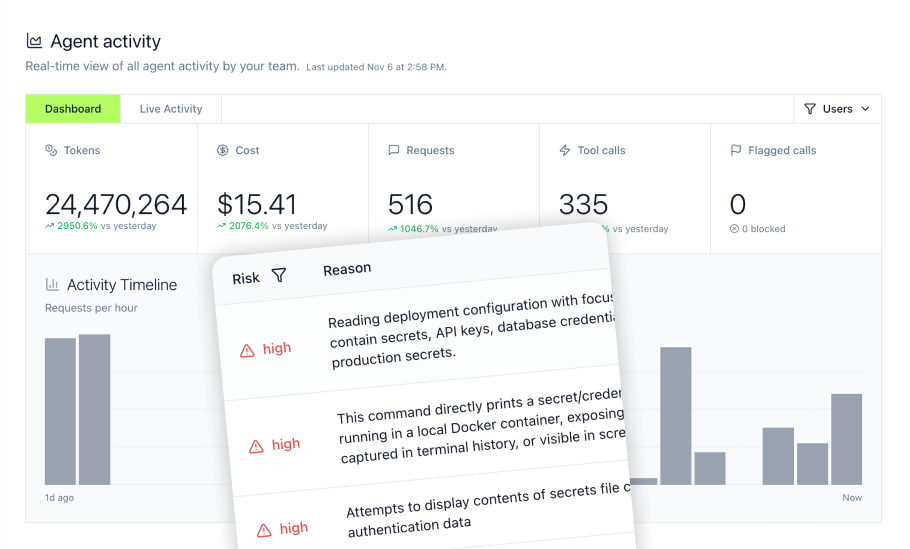
Agent Monitor provides organizational visibility into what AI agents actually do, extending beyond gateway traffic to capture activity from coding-agent environments.
For supported coding-agent environments, Agent Monitor can capture activity such as:
- Prompt submissions: Instructions users give to supported AI assistants
- MCP tool calls: Supported calls such as
browser_navigate,browser_click,browser_fill_form, andbrowser_take_screenshot - Commands: Shell and package commands captured by supported integrations
- File access: Supported file-read activity
- Usage metrics: Token consumption by model, session, user, or agent
Coverage varies by client, agent, and hook phase. The live activity feed shows activity captured by supported integrations and can be filtered by user, tool, or time. Security teams can identify patterns like unusual navigation to external domains, excessive screenshot captures, or attempts to access production environments.
Rules for Playwright Security
Agent Monitor rules can block risky Playwright behavior before execution:
- Tool-name conditions: Flag or block specific Playwright tools where the integration supports enforcement, such as
browser_evaluateorbrowser_run_code_unsafe - Argument matching: Block navigation to unauthorized domains using regex patterns
- Content detection: Identify credentials or PII in form-fill arguments
Rule actions include flag (log for review), block (prevent execution), ask-user (require confirmation), mask (redact sensitive data), and notify (alert via Slack).
For example, a rule might block any browser_navigate call where the URL argument doesn't match approved QA domains, preventing accidental or malicious navigation to production or external sites.
Cost Analysis of Browser Automation Agents
Token costs for Playwright MCP require monitoring as usage scales. Agent Monitor's usage tracking provides:
- Token spend by model (Claude, GPT, etc.)
- Cost attribution by user, agent, and session
- Human versus agent split for chargeback
- Cache-hit rates showing context reuse efficiency
Teams can track Playwright-related usage against internal budgets and investigate unexpected spikes during exploratory testing or bulk test generation.
Applying Runtime Guardrails to Playwright Automation Workflows
Preventing Malicious Actions in Playwright Scripts
Playwright's documentation warns that Playwright MCP is not a security boundary. A practical browser-agent threat model includes:
- Prompt Injection: Malicious page content tricks AI into unintended actions
- Over-broad Session Access: AI uses admin session, performs destructive actions
- Unintended Actions: AI misinterprets ambiguous prompts
- Data Leakage: Page content with customer data enters LLM context
MintMCP's Guardrails address these risks through three complementary layers:
Mint Guard: Managed detection policies screen every tool call for prompt injection, credentials/secrets, PII, and harmful content. For Playwright, this means scanning page content returned from browser operations before it enters the LLM context.
Rules: Declarative conditions match tool names, argument patterns, or content. A rule blocking navigation to any origin not in an approved list directly mitigates the prompt injection risk where malicious pages try to redirect agents.
Gateway Middleware: Customer-authored JavaScript running in a sandbox can implement custom logic like domain allowlists, content transformation, or integration with external classifiers.
Custom Security Logic for Browser Automation
Gateway Middleware enables customer-authored JavaScript controls tailored to Playwright use cases, including resource allowlists, content transformation, DLP integrations, and custom policy enforcement. Implement URL-level navigation controls against MintMCP's current middleware interface rather than relying on an unverified API shape.
Middleware can also integrate with existing enterprise DLP systems. If your organization uses AWS Bedrock Guardrails or Google Cloud Model Armor, middleware can route Playwright responses through these classifiers before returning data to the AI agent.
The middleware runs fail-closed for policy-critical checks: if the external classifier is unavailable, the request blocks rather than proceeding without screening.
Enterprise Security and Compliance for Playwright MCP Deployments
Integrating Playwright with Enterprise Identity Management
Enterprise Playwright deployments require integration with existing identity infrastructure:
- SSO: Okta, Entra ID, Google authentication for user access
- SCIM: Directory group membership automatically provisions access to Virtual MCPs
- RBAC: Organization-level roles for administrative functions; Virtual MCP access policies for tool access
This means QA engineers authenticate through your existing identity provider, their group membership determines which Playwright endpoints they can access, and access changes propagate automatically when directory groups update.
For enterprise SSO setup, configuration includes SAML or OIDC integration with your identity provider. Suspend a user in the IdP, and MintMCP access revokes without manual intervention.
Ensuring Compliance in Automated Workflows
Compliance requirements vary by industry, but common needs include:
SOC 2 Type II: MintMCP provides audit logging of every tool call, credential lifecycle event, and access-policy change. Tamper-evident access-grant history is signed at write time and verifiable offline via published JWKS. MintMCP holds SOC 2 Type II attestation as a baseline security standard.
HIPAA: If Playwright workflows may encounter protected health information, use systems, model providers, agreements, and safeguards appropriate to that data. Prefer synthetic or de-identified test data where feasible. Do not rely on Playwright's --allowed-origins option as the security boundary because Playwright states that it does not affect redirects and can be worked around. MintMCP customers handling protected health information can request HIPAA documentation, and MintMCP signs BAAs.
Data Residency: LLM providers have varying data residency options. Confirm your LLM vendor (Anthropic, OpenAI) supports required geographic regions. MintMCP's Trust Center provides current compliance documentation.
The security overview covers encryption (in transit and at rest), penetration testing, and continuous compliance monitoring.
Operational Controls
When security incidents occur, rapid response is essential. MintMCP provides:
- Kill switch: Org-wide immediate shutdown of all MCP traffic, audited
- Per-VMCP disable: Suspend specific Playwright endpoints without affecting other services
- Connector restart: Restart Playwright server instances without full redeployment
- Credential rotation: Rotate secrets without service interruption
These operational controls exist for suspected credential compromise, runaway agent behavior, or security investigations requiring immediate access suspension.
Solving Enterprise Pains with Playwright MCP Server
Addressing Shadow AI in Browser Automation
The most consistent enterprise pain point is limited visibility into AI agent activity. Engineers install Claude Code, Cursor, or GitHub Copilot on their laptops, connect to Playwright MCP locally, and security teams have no insight into what browsers those agents control, what pages they access, or what data they capture.
Agent Monitor addresses this by capturing activity across multiple clients and platforms. Even if an engineer configures Playwright MCP outside the governed gateway, Agent Monitor can detect MCP usage and surface it for security review.
This visibility extends to the data risk assessment question every security team asks: what enterprise data can these AI tools access? With governed Playwright MCP through a Virtual MCP, the answer is documented in access policies rather than discovered during incident response.
Standardizing Playwright Access
Configuration sprawl creates operational burden when every engineer maintains their own Playwright MCP setup:
- N machines require N Node.js installations and N browser binary downloads
- Credentials scatter across N laptops with N points of potential compromise
- Updates require N manual interventions
- Troubleshooting involves N different configurations
Centralizing through MintMCP's MCP Gateway collapses this complexity:
- Playwright server hosting (no local Node.js required)
- Browser binary management
- Credential injection per call
- Automatic updates without engineer intervention
- Centralized troubleshooting through unified logs
For organizations scaling Playwright automation across QA, development, and operations teams, this consolidation dramatically reduces operational overhead while improving security posture.
Migration Path from Local to Governed Deployment
Phase 1: Preparation
- Inventory existing Playwright MCP installations across the organization
- Identify pilot team of 3-5 engineers for governed deployment
- Provision MintMCP Gateway access and configure Virtual MCP for Playwright
Phase 2: Pilot
- Migrate pilot team from local to governed Playwright MCP
- Document prompt patterns that work well for browser automation
- Measure test authoring time, token costs, and agent accuracy
- Establish review process for AI-generated tests
Phase 3: Rollout
- Expand to full QA team
- Enable audit logging and SIEM export
- Configure guardrails (Mint Guard, domain allowlists)
- Train team on enterprise governance expectations
Phase 4: Optimization
- Refine access policies based on usage patterns
- Implement cost controls and budget tracking
- Evaluate CLI alternative for high-volume scenarios
- Expand to additional teams (developers, operations)
Governing Enterprise Browser Automation with MintMCP
Playwright MCP gives AI agents direct browser control, which makes governance critical at scale. Security teams need clear answers to:
- Who authenticated?
- Which credentials did they use?
- What pages did they access?
- What data entered the LLM context?
MintMCP addresses these questions through four governance layers:
- Virtual MCPs scope Playwright access by team, role, or agent identity.
- SSO integration connects access to your existing identity provider, so directory changes can propagate to MintMCP access.
- Agent identities give autonomous agents their own credentials, scoped permissions, and attributable audit trails instead of relying on human credentials.
- Audit infrastructure records tool calls with identity, timestamps, arguments, and outcomes. Tamper-evident access-grant history separately tracks access changes.
Runtime controls add another layer of protection:
- Mint Guard detects categories such as prompt injection, credentials, PII, and harmful content.
- Rules can restrict tools, match risky arguments, and block unauthorized navigation patterns where supported.
- Gateway Middleware supports custom JavaScript logic, DLP integrations, domain allowlists, transformations, and fail-closed policy checks.
For larger deployments, MintMCP also centralizes operational controls:
- Replace scattered local configurations with governed endpoints.
- Inject credentials per call instead of storing them across user laptops.
- Track usage by user, agent, model, and session.
- Export supported activity to SIEM systems.
- Use operational controls such as organization-wide shutdown, per-VMCP disables, connector restarts, and credential rotation.
Together, these controls give teams centralized identity, access, monitoring, runtime enforcement, and incident-response capabilities for governed Playwright MCP deployments.
Frequently Asked Questions
How does Playwright MCP handle dynamic content and single-page applications?
Playwright MCP uses the browser's accessibility tree rather than visual rendering, which means it reads the DOM state after JavaScript execution completes. For SPAs, the AI agent can issue wait commands before capturing page state, and the accessibility snapshot reflects the current DOM regardless of how content was loaded. This approach works well for React, Vue, Angular, and other SPA frameworks since Playwright interacts with the same DOM structure that screen readers use.
Can Playwright MCP integrate with existing CI/CD pipelines for regression testing?
While Playwright MCP can run in CI/CD through Docker, most teams find that AI-assisted test authoring works better as a development-time tool rather than a CI-time executor. The recommended pattern is using Playwright MCP to generate and refine tests during development, then committing the resulting .spec.ts files to version control and running them via the standard Playwright test runner in CI/CD. This approach provides deterministic regression testing while still benefiting from AI acceleration during authoring.
What happens if the LLM hallucinates selectors or attempts invalid browser actions?
Playwright MCP validates tool arguments before execution and returns structured error messages when actions fail. If the AI references a non-existent element, Playwright returns an error that the AI can interpret and retry with a corrected approach. The accessibility-first design helps reduce hallucination since the AI works from the actual DOM structure rather than guessing at visual layouts. For production deployments, guardrails can block categories of commands entirely, and the review process catches issues before tests reach version control.
How does session management work for tests requiring authentication?
Playwright MCP supports three profile modes: persistent by default, which preserves login state and browser storage on disk; isolated mode, which starts each session fresh and does not persist state; and browser extension mode, which connects to existing browser tabs and reuses their authenticated state. For authenticated testing, the extension mode allows QA engineers to manually log in through their browser with MFA, then have the AI agent use that authenticated session without re-authenticating. This eliminates the need to automate complex authentication flows while maintaining security. Storage-state files can also preserve cookies and localStorage across sessions for less sensitive authentication scenarios.
How do I evaluate whether Playwright MCP is ready for our compliance requirements?
Start with the security checklist: process isolation (non-privileged user), transport security (stdio or HTTPS), authentication architecture for HTTP deployments, file access restrictions, origin allowlists, profile isolation, credential management through secret managers, capability restrictions, and audit logging. If you operate in regulated industries (healthcare, finance), confirm that your LLM provider offers compliant API tiers and appropriate data processing agreements. MintMCP's governance layer addresses many checklist items (authentication, RBAC, audit, operational controls) but requires proper configuration. Review the MCP data risk guide for a framework to assess your specific compliance requirements against Playwright MCP capabilities.