Every enterprise team using Slack faces the same challenge: turning AI capabilities into practical, governed tools that employees can use safely every day. As MCP adoption expands across AI tools and enterprise workflows, the infrastructure for AI coworkers is becoming more practical for production teams. Foundation model providers continue expanding support, and the real question is how to deploy these agents with proper security, authentication, memory governance, and observability. Using an MCP gateway gives your organization centralized control over AI systems connecting to Slack and internal systems, turning scattered AI experiments into governed enterprise tools.
A Slack AI coworker is not just a chatbot in a channel. It is a long-running agent that lives where employees already work, holds memory, continues work across days, and operates alongside employees. MintMCP frames this as two connected layers: MCP Gateway for governed data and tool connections, and Agent Gateway for the identities, permissions, memory, and monitoring needed to run AI coworkers safely.
Key Takeaways
- AI coworkers in Slack are long-running, Slack-native agents that hold memory, continue work across days, and operate alongside employees
- AI coworkers connect large language models to internal systems through the Model Context Protocol, enabling agents to access databases, CRMs, and collaboration tools
- The "last mile problem" in enterprise AI centers on giving agents secure, governed access to internal data without extensive engineering overhead for each integration
- Virtual MCP Bundles package tool access, policy enforcement, and audit logging into single governance units per team, role, use case, or agent identity
- Per-agent identity with scoped credentials allows credential rotation and revocation for individual agents without affecting users or other agents
- Enterprise memory should be scoped across private, team, organization, and customer contexts, and should be company-owned, versioned, reviewable, auditable, and portable
- Shadow AI detection identifies off-gateway MCP usage in developer tools, addressing ungoverned agent activity that bypasses security controls
- Custom policy code execution on every tool call enables inline DLP integration with platforms like AWS Bedrock Guardrails and Microsoft Purview
Understanding the Foundation: What Is an AI Coworker in Slack?
An AI coworker operates inside Slack as an always-available teammate that can query databases, generate reports, update CRM records, and execute workflows on behalf of employees. Unlike simple chatbots that only respond to predefined commands, AI coworkers leverage the Model Context Protocol to dynamically access the tools and data sources they need for each task.
The Model Context Protocol creates a standardized way for AI agents to connect with enterprise systems. For enterprise teams, the related "last mile problem" is giving agents secure access to internal systems and data sources without requiring custom engineering work for every integration.
For production Slack deployments, the control layer needs to govern more than tool calls. A Slack AI coworker needs a durable agent identity, scoped permissions, governed memory, and monitoring across gateway-managed and off-gateway activity. This is the role of an Agent Gateway built on an MCP Gateway foundation.
The 'Last Mile Problem' in Enterprise AI
Traditional AI deployments hit a wall when agents need to interact with production systems. Each connection to Salesforce, Jira, or internal databases historically required:
- Custom API integration code for each system
- Manual credential management across multiple services
- Separate authentication flows per integration
- Individual audit logging implementations
- Tool-specific access controls
- Separate memory and monitoring controls for each agent workflow
This overhead meant that connecting a single AI agent to five enterprise tools could require weeks of engineering time. The Model Context Protocol standardizes these connections, but enterprises still need governance, authentication, observability, memory controls, and policy enforcement layers on top of the raw protocol.
Core Components of an AI Coworker
A production-ready Slack AI coworker requires several infrastructure components working together:
Language Model Backend: The AI reasoning engine, such as Claude, ChatGPT, Gemini, or custom models, that interprets requests and generates responses.
MCP Server Layer: Connectors that translate between the AI model and enterprise systems. Each MCP server exposes tools from a specific service, whether that's GitHub, Salesforce, or Snowflake.
MCP Gateway: The control plane that enforces authentication, manages credentials, applies access policies, and logs every tool call for audit purposes.
Agent Gateway: The agent control layer that governs persistent agent identities, scoped permissions, memory, and monitoring for long-running AI coworkers.
Slack Integration: The interface layer that connects the governed AI agent to Slack channels, enabling natural language interaction with employees.
Enhancing Slack with AI: Smart Features and Automation
AI coworkers transform Slack from a messaging platform into an operational command center, especially when routine tasks require data from multiple enterprise systems. The value is highest when employees can complete governed workflows without switching between multiple applications.
Automating Routine Tasks with AI
The most immediate value comes from automating repetitive workflows that previously required manual context-switching between applications:
Data Analysis and Reporting: An AI coworker can query databases, aggregate metrics, and generate formatted reports directly in Slack. Ask "What were our Q3 sales by region?" and receive a complete breakdown without opening a BI tool.
Customer Support Triage: Agents connecting to CRM and ticketing systems can pull customer history, suggest responses, and update ticket status, all from within a Slack conversation.
Development Workflow Management: Engineering teams use AI coworkers to check CI/CD pipeline status, create Jira tickets, and review pull request summaries without leaving Slack.
Meeting Preparation: Before customer calls, an AI coworker can compile recent interactions, open support tickets, and contract details into a briefing document.
Long-Running Follow-Through: A Slack AI coworker can remember the state of a project, continue work across days, and return with updates when a workflow changes or a human decision is needed.
Integrating External Systems for Seamless Workflows
The power of AI coworkers scales with the number of systems they can access. A single coworker connected to Linear, Notion, and Gmail can:
- Create project tasks from Slack discussions
- Update documentation based on meeting notes
- Draft follow-up emails to stakeholders
- Cross-reference information across all three systems
Pre-configured connectors for common enterprise tools help teams expand an AI coworker's capabilities without building every integration from scratch. For enterprise use, those connectors should sit behind a permission model that scopes which users and agents can access which tools, what each tool can do, and how each action is audited.
Building Your AI Coworker: A Step-by-Step Guide for Enterprise Teams
Deploying an AI coworker requires decisions about deployment strategy, authentication models, memory scope, and access controls. The following implementation roadmap covers each phase from initial planning through production rollout.
Week 1: Planning and Architecture
Define Use Cases: Start by identifying three to five high-value workflows that currently require manual effort. Good candidates involve:
- Repetitive data lookups across multiple systems
- Report generation that follows predictable patterns
- Status checks that require logging into several applications
- Document drafting based on structured inputs
- Follow-up work that continues across days or handoffs
Map Required Integrations: For each use case, list the systems the AI coworker needs to access. Consider read versus write permissions for each system, as most organizations start with read-only access before enabling write operations.
Define Memory Scope: Decide what memory the AI coworker should retain and who owns it. Separate private, team, organization, and customer memory so the agent can maintain continuity without overexposing context.
Identify Stakeholders: AI coworker deployments touch multiple teams including engineering, security, IT, AI Operations, and business units.
Week 2: Infrastructure Setup
Deploy MCP Gateway: The gateway becomes the central control plane for AI agent traffic. Setup involves:
- Connecting identity provider, such as Okta, Azure AD, or Google Workspace, for SSO
- Configuring SCIM for automatic user provisioning based on group membership
- Enabling audit logging with export to your SIEM platform
- Defining tool-level allowlists and rule-based policies for the first use cases
Configure Initial Connectors: Start with the MCP servers required for your priority use cases. The Slack setup connects your AI coworker to channels and direct messages.
Establish Bundle Architecture: Create Virtual MCP Bundles that match your organizational structure and use cases. Each Bundle ties a SCIM group to a curated list of MCP servers with specific access policies.
Create Agent Identity: For long-running Slack AI coworkers, assign each agent its own identity, scoped credentials, and approved Bundle access rather than relying on a shared service account or inherited creator permissions.
Choosing Your Deployment Strategy
Three deployment models fit different organizational needs:
One-Click Pre-Configured Connectors: Fastest path to production. Activate connectors from a catalog with built-in authentication and access controls. Best for standard enterprise tools.
Hosted Custom MCP Servers: For custom internal systems, deploy stdio-based MCP servers that get automatically converted to hosted, production-ready services with OAuth wrapping. No code changes required to your existing MCP server code.
Virtual MCP Bundles: Create role-based and use-case-based endpoints that combine multiple servers with tool-level access control. A "Sales Team" Bundle might include read access to Salesforce, HubSpot, and Snowflake, but block write operations to financial systems.
Agent Bundles: Give each Slack AI coworker a persistent agent identity with scoped tools, M2M authentication, and an "act as agent" flow for connectors that require per-agent OAuth.
Week 3: Configuration and Testing
Define Access Policies: Tool-level access control lets you enable specific capabilities while blocking others. Common policy patterns include:
- Database reads allowed, writes blocked
- CRM record viewing permitted, deletion prohibited
- Document access scoped to specific folders or labels
- API calls rate-limited per user, team, or agent
- Memory retrieval scoped to private, team, organization, or customer context
Test with Pilot Group: Select 5 to 10 users from your target team for initial testing. Monitor their interactions, gather feedback on accuracy and usefulness, and identify edge cases that require policy adjustments.
Validate Audit Trail: Confirm that every tool call generates complete audit records with user identity, agent identity, tool calls with parameters, data flows, timestamps, and memory used for compliance investigations.
Week 4: Production Rollout
Gradual Expansion: Roll out to additional teams by adding users to appropriate SCIM groups. Bundle membership automatically grants access to configured MCP servers with enforced policies.
Monitor Adoption Metrics: Track usage patterns to identify most frequently used tools, peak usage times, error rates, user adoption by team and role, and the quality of memory retrieved by the AI coworker.
Iterate on Capabilities: Based on usage data, expand the AI coworker's capabilities by adding new MCP servers, adjusting access policies, or refining memory scopes.
Ensuring Security and Compliance for Your Slack AI Coworkers
Security requirements for AI agents exceed those for traditional applications. An AI coworker with access to customer data, financial systems, and internal documents requires strong controls at every layer. The NIST AI Risk Management Framework gives organizations a useful reference for governing, mapping, measuring, and managing AI risk across the AI system lifecycle.
The Bundle Architecture for Secure Governance
The Bundle model packages tool access, policy enforcement, and audit logging into single governance units. This architecture solves several security challenges:
Credential Isolation: Each AI agent gets its own persistent identity with scoped credentials that can be rotated independently. When each agent has its own credentials and scope, you can revoke access for a compromised agent without disrupting other agents or users.
No Shared Keys: Traditional integration patterns use shared service accounts that become security liabilities. Per-agent identity eliminates shared keys that could leak or require organization-wide rotation.
SCIM-Driven Membership: Bundle access automatically syncs with identity provider group changes. Removing someone from a security group immediately revokes their AI coworker access without manual intervention.
Cascading Policies: Organization-level policies cascade to team-level Bundles, ensuring consistent security controls while allowing team-specific tool access.
Memory Boundaries: Agent memory should be scoped so private, team, organization, and customer context stay separated. For enterprise teams, memory should be company-owned, versioned, reviewable, auditable, and portable where practical.
Real-Time DLP and Compliance Controls
Custom policy code execution on every tool call enables inline integration with existing security infrastructure:
Supported DLP Platforms:
- AWS Bedrock Guardrails for content filtering
- Google Cloud DLP for data classification
- Microsoft Purview for information protection
- Nightfall for PII detection
- Skyflow for data privacy
Policy Actions: Rules can block, flag, or alert based on detected conditions. A policy might block any query that would return more than 1000 customer records, flag requests accessing financial data outside business hours, or alert security teams when an agent attempts to access restricted folders.
Monitoring and Auditing AI Coworker Activity in Slack
Visibility into agent actions separates enterprise deployments from ungoverned experiments. Real-time monitoring catches security issues before they escalate, while comprehensive audit trails satisfy compliance requirements.
Detecting Shadow AI and Malicious Activity
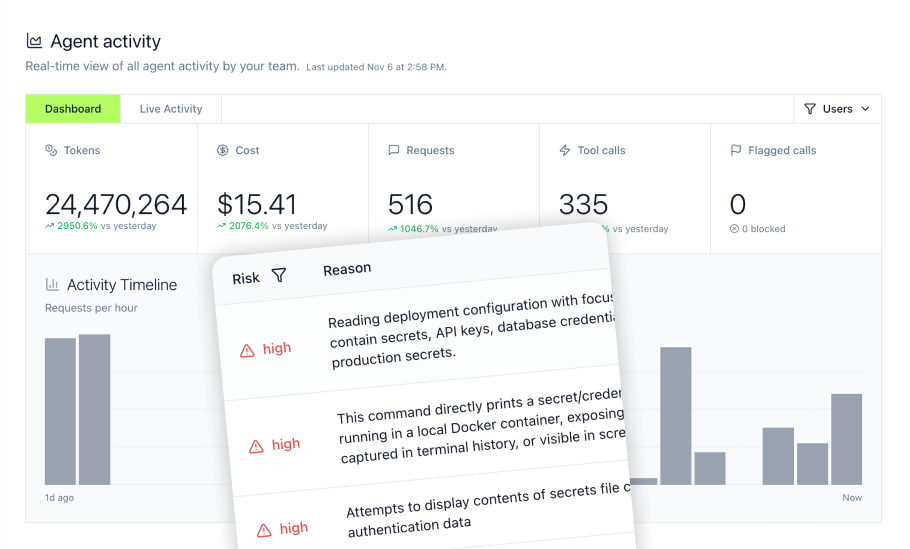
Agent Monitor tracks AI coworker activity in real time across the organization, including MCP calls made outside the gateway through hooks in tools like Cursor and Claude Code.
Together, MCP Gateway and Agent Monitor provide two-layer governance. The gateway governs approved MCP traffic and tool access, while Agent Monitor extends visibility to local non-MCP agent activity such as file reads, shell commands, and prompt submissions.
Built-In Detection Rules identify:
- PII exposure in agent responses
- Credential leakage including API keys and tokens
- Risky bash commands executed by coding agents
- Prompt injection attempts targeting the AI coworker
Shadow AI Discovery: Developers sometimes run local MCP servers that bypass organizational controls. MDM integration enables push of detect-only or enforce-mode configurations to developer machines, ensuring consistent policy application even for off-gateway activity.
Comprehensive Logging for Audit Trails
Conversation-level logging captures complete context for every interaction including the original user prompt, which tools the AI coworker called, parameters passed to each tool, data returned from enterprise systems, the final response delivered to the user, and timestamps with user and agent attribution for each step.
Retention and Export: Configure retention policies based on compliance requirements. Export logs to SIEM platforms including Microsoft Sentinel, Splunk, or S3 for integration with existing security workflows.
Immutable Records: Audit records cannot be modified after creation, providing tamper-proof evidence for compliance investigations.
Memory History: For long-running AI coworkers, auditability should also include memory changes, memory sources, review status, and which memories were used in high-impact workflows.
Optimizing Productivity: Best Practices for Slack AI Coworker Integration
Deploying an AI coworker is the starting point. Maximizing adoption and productivity requires ongoing optimization based on actual usage patterns.
Identifying High-Impact Use Cases
Focus initial deployment on workflows that meet these criteria:
- High Frequency: Tasks performed multiple times per day by multiple team members generate the most time savings.
- Clear Structure: Workflows with well-defined inputs and outputs translate cleanly to AI coworker interactions.
- Multi-System Dependency: Tasks requiring information from several applications benefit most from AI coworker integration.
- Low Error Tolerance: High-stakes tasks can be good candidates because the AI coworker's audit trail provides verification that manual processes lack.
- Long-Running Context: Workflows that continue across days, projects, or handoffs benefit from governed memory.
Streamlining Onboarding with VMCPs
Virtual MCP (VMCP) abstraction reduces configuration complexity for non-technical users. Instead of understanding individual MCP servers and their capabilities, users interact with role-based and use-case-based endpoints that present only the tools relevant to their work.
The Claude Cowork guide covers onboarding patterns that accelerate team adoption.
Onboarding Best Practices:
- Create team-specific Bundles before rollout so users have immediate access to relevant tools
- Provide 2 to 3 example prompts that demonstrate the AI coworker's capabilities for common tasks
- Schedule brief training sessions, around 30 minutes, focusing on high-value use cases
- Designate team champions who can answer questions and share effective usage patterns
- Explain what the AI coworker can remember, who can review that memory, and how employees should correct outdated context
Future-Proofing Your Slack AI Strategy: The Model Context Protocol Ecosystem
MCP's growing ecosystem gives enterprises a more standardized way to connect AI agents with tools and data sources. This standardization can make AI coworker infrastructure easier to reuse across teams, clients, and future agent workflows.
The Rise of MCP as an Industry Standard
The MCP ecosystem expanded rapidly as more AI tools and enterprise teams adopted MCP-compatible workflows. In December 2025, Anthropic donated MCP to the Agentic AI Foundation, a directed fund under the Linux Foundation, helping move MCP toward more vendor-neutral governance. This standardization wave means investments in MCP-based infrastructure apply across current and future AI tools, providing:
- Cross-Vendor Compatibility: AI coworkers built on MCP work with Claude, ChatGPT, Gemini, Cursor, and other MCP-compatible clients without rebuilding integrations for each platform.
- Ecosystem Growth: The MCP connector ecosystem continues expanding as vendors and community contributors add support for additional services.
- Protocol Stability: Open governance helps the protocol evolve through a transparent process rather than unilateral changes by any single vendor.
Interoperability with Leading LLM Platforms
MCP gateway infrastructure supports agents regardless of which language model powers them. Compatibility spans Claude, ChatGPT and custom GPTs, Gemini, Cursor, Windsurf, GitHub Copilot, Replit, Open WebUI, and LibreChat.
This broad compatibility means your MCP server investments, access policies, and audit infrastructure remain valuable even as your organization evaluates different AI platforms. For Slack AI coworkers, the next step is Agent Gateway infrastructure that governs the persistent agent itself: its identity, permissions, memory, and monitoring.
Choosing the Right Partner for Your Enterprise Slack AI Deployment
The MCP gateway market includes multiple vendors with different architectural approaches. Evaluating options requires understanding how each handles authentication, policy enforcement, credential management, agent identity, and memory governance.
Key Differentiators in the MCP Gateway Space
- Bundle Simplicity vs. Multi-Object Configuration: Some platforms require configuring separate objects for plugins, access rules, and agent accounts. The Bundle model combines tool access, policy, and audit into a single governance unit per team, role, use case, or agent identity.
- Per-Agent OAuth vs. Shared Tokens: Credential management approaches vary significantly. Per-agent OAuth with independent rotation and revocation provides stronger security than shared tokens or inherited user credentials.
- Custom Policy Code vs. Declarative-Only Rules: Organizations with specific security requirements need the ability to write custom policy code rather than choosing from preset options. Look for platforms supporting custom middleware that can integrate with your existing DLP and guardrails investments.
- Shadow AI Detection: Gateway-only visibility misses off-gateway MCP usage in developer tools. Agent Monitor capabilities that hook into Cursor, Claude Code, and similar tools provide broader organizational visibility.
- Agent Gateway Coverage: For Slack AI coworkers, evaluate whether the platform governs the agent itself, including identity, permissions, memory, and monitoring, rather than only the MCP server connections.
Evaluating Vendors for Scale and Security
When assessing MCP gateway providers for Slack AI coworker deployment, prioritize:
- Catalog Breadth: The number of pre-built connectors determines how quickly you can expand capabilities. A large server catalog provides coverage for most enterprise tools.
- Authentication Options: OAuth 2.0 and SSO support, plus automatic credential rotation, reduce operational overhead.
- Audit Completeness: Full conversation-level logging with per-user and per-agent attribution satisfies compliance requirements. Export to SIEM platforms enables integration with existing security workflows.
- Deployment Flexibility: Managed SaaS accelerates deployment, while VPC or self-hosted options may be evaluated for specific enterprise architecture needs.
- Memory Governance: Long-running Slack AI coworkers should support scoped, reviewable, auditable, portable memory rather than opaque memory stores that are hard for security and operations teams to inspect.
Why MintMCP Delivers Governed AI Coworker Infrastructure
MintMCP provides the governance layer that enterprises need to deploy AI coworkers with confidence. While multiple vendors offer MCP connectivity, MintMCP addresses the security, compliance, and operational requirements that enterprise security, IT, AI Operations, and engineering teams face in production deployments.
MintMCP provides two connected layers for Slack AI coworkers. Its MCP Gateway governs data and tool connections for the AI systems users already run, including Claude, Cursor, ChatGPT, Gemini, and Copilot. Its Agent Gateway builds on that foundation with controls for agent identities, permissions, memory, and monitoring.
- Centralized Gateway with a Broad MCP Connector Catalog: Deploy AI coworkers that connect to Salesforce, GitHub, Slack, HubSpot, Notion, Linear, Gmail, Stripe, and other enterprise tools. Pre-configured connectors eliminate weeks of integration engineering, while hosted custom MCP server support enables connections to internal systems without infrastructure overhead.
- Data-Permissions-First Architecture: MintMCP starts with SSO, SCIM-driven RBAC, IdP groups, Virtual MCP Bundles, tool-level policy, and audit, then enables agents on top. This ensures an agent's access is a subset of an already-governed permission model.
- Bundle Architecture for Governed Access: Virtual MCP Bundles create per-use-case endpoints with SCIM-driven membership, curated tool lists, and per-Bundle access policies. Agent Bundles extend this model to AI agents, giving each deployed agent its own rotatable credentials, scoped tools, M2M authentication, and "act as agent" flow for connectors that require per-agent OAuth.
- Managed Agents for Slack-Native AI Coworkers: MintMCP's Managed Agents platform supports long-running AI coworkers with their own independent identity, memory, sandboxed runtime, scoped tool access through Virtual MCP Bundles, and Slack-native invocation.
- Real-Time Security and Compliance: Custom policy code execution enables inline DLP integration with AWS Bedrock Guardrails, Google Cloud DLP, Microsoft Purview, Nightfall, and Skyflow. MintMCP is SOC 2 Type II audited, compliant with HIPAA standards, penetration tested, and built to audit governed agent activity. Customers handling protected health information can request HIPAA documentation, and MintMCP signs BAAs.
- Complete Visibility Across AI Activity: Agent Monitor tracks actions in real time, including off-gateway activity in Cursor and Claude Code. Detect PII exposure, credential leakage, and prompt injection attempts with built-in rules that provide security teams with comprehensive observability.
- Enterprise-Ready Infrastructure: Data encrypted in transit and at rest, data residency options, uptime SLA, and security documentation are available through the Trust Center. Teams with regional deployment requirements should validate data residency scope during procurement. For engineering teams deploying AI coworkers and security teams requiring audit trails, MintMCP delivers the governance layer that makes enterprise AI adoption practical.
Frequently Asked Questions
What is an AI coworker in Slack and how does it differ from a regular chatbot?
An AI coworker uses the Model Context Protocol to dynamically access enterprise systems based on the task at hand, rather than responding to a fixed set of commands. Regular Slack chatbots can only perform actions that were explicitly programmed, while an AI coworker can query databases, update CRM records, generate reports, and execute multi-step workflows by connecting to the tools it needs for each request.
The key difference is persistence. A Slack AI coworker is a long-running agent that can hold memory, continue work across days, and operate alongside employees. That persistence makes governance more important: each coworker needs scoped permissions, auditable memory, and monitored actions.
What is an Agent Gateway for Slack AI coworkers?
An Agent Gateway is the control layer for long-running agents that work alongside users. It governs agent identities, permissions, memory, and monitoring so Slack AI coworkers can operate safely across enterprise systems. In MintMCP's model, Agent Gateway builds on MCP Gateway: the MCP Gateway governs data and tool connections, while the Agent Gateway governs the agent as an operating identity with scoped access, memory, and visibility.
How do organizations ensure the security and privacy of sensitive enterprise data when using AI agents in Slack?
Enterprise deployments require multiple security layers: SSO integration for user authentication, per-agent identity with scoped credentials for service-to-service communication, tool-level access controls that restrict which operations agents can perform, and comprehensive audit logging that captures every tool call with full context. DLP integration enables real-time scanning for PII, credential leakage, and policy violations. Organizations should verify that their MCP gateway provider is properly audited and can support their compliance requirements.
How should Slack AI coworkers handle enterprise memory?
Slack AI coworker memory should be treated as governed enterprise infrastructure, not an opaque retrieval feature. Teams should define private, team, organization, and customer memory scopes; maintain version history; review high-impact memory changes; audit what memory an agent used; and preserve portability where practical. Memory should follow Git-like principles so it remains company-owned, reviewable, auditable, and portable.
Can existing internal tools and databases be connected to AI coworkers in Slack using MCP?
Yes. Organizations can deploy custom MCP servers for internal systems using stdio transport, which the gateway converts to hosted, production-ready services with OAuth wrapping. No code changes are required to existing MCP server implementations. For standard enterprise tools, pre-configured connectors eliminate integration engineering entirely. The combination of pre-built connectors and support for custom servers means most enterprise architectures can be integrated.